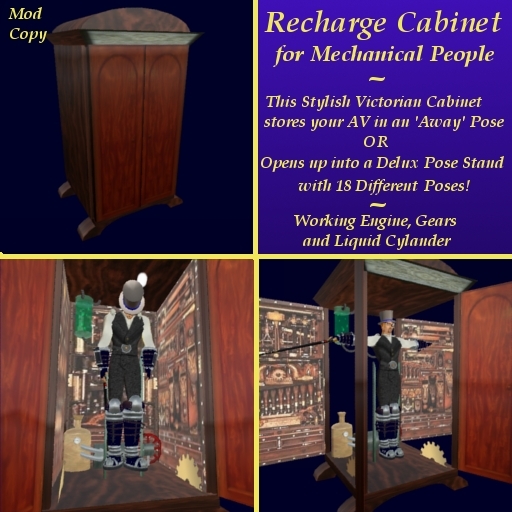

Greetings and thanks for your interest in Kheph's Automaton Recharge/Repair Cabinet!
This is the first in a line of products for SteamPunk Mechanical People. :)
This Decorative Victorian Wardrobe opens (touch the doors to open them) to reveal a small workstation for your Automaton AV. Old fashioned tools line the walls, a small steam engine sits on the floor, brass gears turn on the sides and a "mad scientist" style canister of green liquid bubbles near the top. In the center are two metal spikes, perfect for supporting your mechanical AV when in "sleep mode"!
(The Cabinet is entirely modifiable. So if there are too many prims for you, you may remove any of the decorations you wish! Or add to them. Or whatever you desire!)
To use it, just right click and "Sit" on the object. Your AV will take position on the metal supports, and a hose from the green bubbling canister will run into your AV's back. The engine will spring to life for a few seconds and run the metal gears. Your AV will hang there in an "away" pose, as if completely asleep (or switched off, as the case may be!).
But that's not all!
This Cabinet also serves as a fully-functional Deluxe Pose Stand- so you can work on your AV!
Click the floor of the Cabinet while your AV hangs on the supports, and it will spring to life once again. The motor and gears will run, and the walls of the cabinet will ALL swing open- giving you a full view of your AV from all sides. At the same time, a drop-down menu will appear, allowing you to pick one of several poses. (There are two pages of them.)
NOTE, the "Arms Out" pose is best for working on your AV. The remaining poses are standard SL Animations that will let you see how your AV will look when walking, sitting, meditating, dancing, holding a gun, riding a cycle, etc, etc..
When you are done working on your AV, you may simply stand up- the Caninet will spring to life once again and all the sides will close. If you want to remain on the stand instead, you may click the floor and choose "RECHARGE" from the drop down menu (on the second page). The sides will close and your AV will return to the "Away" or sleeping pose.
Enjoy!
