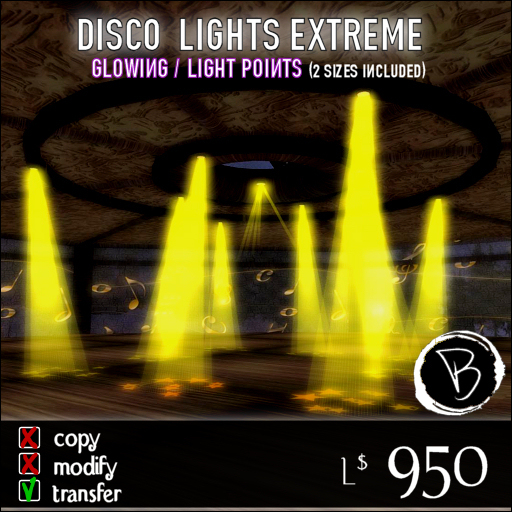

Disco Lights Extreme - 2 Sizes Included. (Remote Controlled)
The most advanced Club Lights System on Second Life. It includes all the lighting features you desire in a single product.
The product includes two version: one of 20 meters of diameter (8 cone lighs + 4 lasers + 8 projected shapes), the other of 10 meters (4 cone lights + 4 lasers + 4 projected shapes).
Key Features:
- Entierely setup via menu interface (Owner/Group);
- Glowing and lights moving effects;
- Prim Point moving lights (OpenGL) "Firelights";
- Projected shape with the possibility to add your own logo;
- Multicolored (Manually or Random);
This lights uses the "glowing" effect, for the best result be sure to enable the "Basic Shaders" (Preferences... > Graphics > Custom > "Basic Shaders"). However if you don't use it, you may adjust the actual transparency (Alpha +/-) to find the best compromise.
MAIN MENU:
----------------
ON: turn the apparel ON.
OFF: turn the apparel OFF.
CANCEL: used in any menu to close the actual menu.
Colors: open the Colors Menu.
Speed: open the Speed Menu.
Textures: open the Textures Menu.
Firelig ON/OFF: turn the firelights on and off (read the firelight section for the details)
Setup: open the Setup Menu.
Height: open the Height Menu.
Users: switch to owner only or group.
Reset: reset the apparel.
COLORS MENU:
--------------------
Color 0-6: Select a fixed color.
Rainbow: cycle between the 6 colors automagically each 5 seconds.
R/G/B: adjust the fixed color manually chainging the Red, Green and Blue components.
SPEED MENU:
-----------------
Speed +/-: adjust the rotation speed.
Stop: stops the rotation.
Reset Speed: return to the default speed.
TEXTURES MENU:
---------------------
Texture 0-8: select a static texture (8 is no shape projected on the ground)
Random: cycles trought the 7 different textures automagically each 7 seconds.
Load Logo (Owner Only): load your own texture. Press the button and the type "/20 UUID" in the chat. To read the UUID of a texture (you must have permission on it), you have into your inventory right click on it and select "Copy Asset UUID", then you may use the key combination "CTRL-V" to paste it in the chat. I suggest to make your own logos in white and with transparency for a realistic effect.
HEIGHT MENU (Owner Only):
------------------------------------
Height +/-: adjust the projected shape height (it actually stops the rotation if it is active).
Reset Height: sets the shapes height to the default (about 10 meters lower than the top frame).
Firelights:
They are "real" light in the three main components (RED, GREEN, BLUE) that floats around the frame and will illuminate the area with a nice effect. They are TempOnRez and Phantom prims. Notice: the client must have the option "Nearby local lights" turned on to see the lights (it is off by default). To turn it on, go into your Edit menu > Preferences > Graphics, tick the option "Custom" (if it's not ticked already), and select the option "Nearby local lights" (instead of "Sun and moon only"). Notice: the firelights may take a while (up to 60 seconds) to disappear after turning off the lights.
http://www.vittoriobeerbaum.com/site/images/lights_logo.jpg
====================
REMOTE CONTROL:
You must REZ the object Called: "Disco Lights Extreme Controller". The commands are issued simwide (whole SIM) so it's not important where the controller is placed as along it is in the same simulatore where the lights are operating. The chat commands may be used ONLY by the owner (no group).
The default channel is: 100
Accepted commands are (assuming you are using the default channel):
/100 channel <new channel>
/100 lights on
/100 lights off
/100 lights reset
/100 color <color number>
/100 color rainbow
/100 color +
/100 color -
/100 speed +
/100 speed -
/100 texture <texture number>
/100 texture random
/100 texture +
/100 texture -
You may assign this command to your "Shortcut Keys" using a Gestures.
An example has been provided to turn lights ON and OFF with the keys combination: SHIFT+F2 and SHIFT+F3 - Be sure to activate the gestures provided called Lights ON and OFF.
Further informations may be found at: http://www.vittoriobeerbaum.com
<==============================>
All our stuff is built by a consistent number of primitives. Since most of them (ie: guitars) are attachments, they won't affect the simulator primitives usage. However if you plan to rez this objects into your land (ie: for an exposition) be sure to have enough free prims available.
Any update to the product you purchased is *FREE*. Please signup to the "Beerbaum Productions" Group to receive the news about new versions.
Comments must be sent to: Vittorio Beerbaum - Please use a notecard, don't use IM's, they would be "capped". If you like you may use an email to: info@vittoriobeerbaum.com

