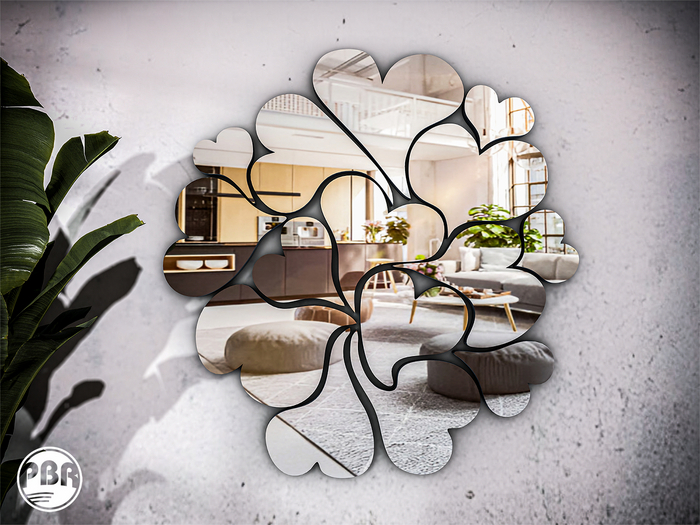


֍ .imegica. Bloom wallMirror (PBR) DEMO
• THE DEMO VERSION WILL AUTO DELETED AFTER 10 MINUTES.
• Mirror: 4 land impact.
• Reflex's Mirror.
• Double texture layers "PBR + Legacy".
• 100% original mesh. Materials enabled.
• Modify, copy, no transfer. [no mod in the DEMO version].
֍ FIRESTORM | How to see yourself in a PBR mirror:
IMPORTANT
To see PBR mirrors correctly, your graphics settings must be enabled properly.
Reflection quality depends on your computer hardware and your viewer settings.
How to configure (Firestorm):
• On the top menu, click Avatar → Preferences or press Ctrl + P
• Go to Graphics → General
For an acceptable mirror reflection, set the following options:
• Enable Screen Space Reflections
• Enable Mirrors
• Reflection Detail must be at least Static & Dynamic
(Use Realtime only if your computer can handle it)
• Mirror Resolution:
– 1024 is enough for normal use
– 2048 gives better quality but reduces FPS
(Recommended only for taking pictures)
• Mirror Update Rate:
– Adjust according to your hardware limits
֍️ Known PBR limitations (Firestorm)
PBR mirrors may show some visual glitches from time to time.
These are Second Life PBR limitations, not defects in the mirror.
1. Flickering or blinking mirrors
Sometimes mirrors may flicker or briefly turn black, even on powerful computers.
If this happens:
• Go to Graphics → Rendering
• Lower Max Reflection Probes
(Medium or lower usually fixes the issue)
2. Camera-based viewing behavior
PBR mirrors are designed to be viewed with your avatar, not directly through the camera.
When using the camera to look closely at a mirror, reflections may appear unstable or disappear depending on the angle.
This is a known PBR behavior and can happen occasionally.
֍ SECOND LIFE OFFICIAL VIEWER | How to see yourself in a PBR mirror:
IMPORTANT
To see PBR mirrors correctly, you must use a recent version of the official Second Life Viewer.
Reflection quality depends on your computer hardware and your graphics settings.
How to configure (Official Viewer):
• On the top menu, click Me → Preferences or press Ctrl + P
• Go to Graphics
• Click Advanced Settings
For an acceptable mirror reflection, set the following options:
• Reflection Detail must be at least Static & Dynamic
(Use Realtime only if your computer can handle it)
• Mirror Resolution:
– 1024 is enough for normal use
– 2048 gives better quality but reduces FPS
(Recommended only for taking pictures)
• Mirror Update Rate:
– Adjust according to your hardware limits
֍️ Known PBR limitations (Official Viewer)
PBR mirrors may show some visual glitches from time to time.
These are Second Life PBR limitations, not defects in the mirror.
1. Flickering or blinking mirrors
If mirrors flicker or turn black occasionally:
• In Advanced Settings, lower Max Reflection Probes
(Medium or lower usually helps)
2. Camera-based viewing behavior
PBR mirrors are designed to be viewed with your avatar, not directly through the camera.
When using the camera to inspect a mirror from a distance or sharp angle, reflections may appear unstable or disappear.
This is a known PBR behavior and may happen occasionally.
֍ Policy:
• BEFORE BUYING, TRY THE DEMO. ..::NO REFUNDS::..
֍ Any doubt or question, contact Jackie Brenner.
- PBR Materials
- Reflex's Mirror
- Double texture layers "PBR + Legacy"


