CaveTech – Discord Doorbell
01/2026
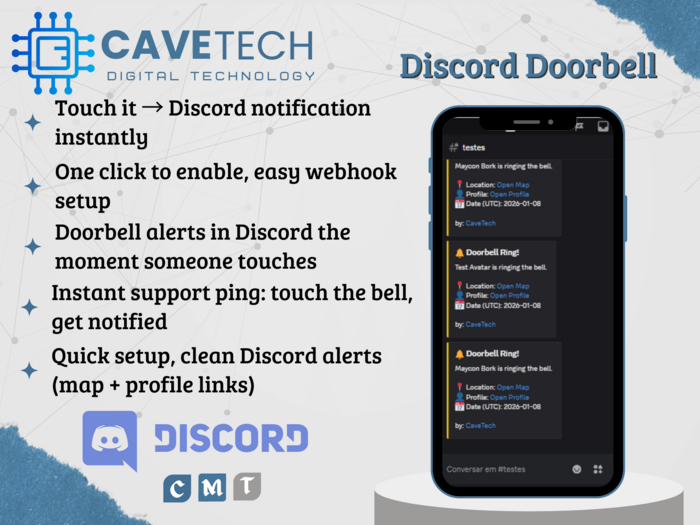
Need a simple “ring the bell” button that alerts you on Discord instantly? CaveTech – Discord Doorbell turns any in-world object into a clickable doorbell. When someone clicks it, your Discord channel receives a clean notification with avatar name, map link, profile link, and UTC date — perfect for stores, rentals, customer support, roleplay entrances, or private call buttons.
What it does
• Any non-owner click sends a Discord notification
• Sends a clean Discord embed/card with:
• “Avatar Name is ringing the bell.”
• Location: Open Map (clickable SL map link)
• Profile: Open Profile (clickable profile link)
• Date (UTC)
• Owner-only menu to set Webhook, Enable/Disable, and Test
• Built-in anti-spam: global + per-avatar cooldown
• Optional: also IM the owner on each ring (toggle in Options)
• Saves settings inside the object (Linkset Data)
Why you’ll love it
✔️ Fast setup: paste webhook, enable, done
✔️ Perfect for support desks, store entrances, rentals, and roleplay
✔️ Clean links (map + profile) so you can react instantly
✔️ Anti-spam protection for busy areas
✔️ Duplicate your configured object for multiple locations
Included
• CaveTech – Discord Doorbell (object)
• CaveTech_DiscordDoorbell (script)
• Quick README (setup & usage)
• Permissions: Copy / Modify / No Transfer (may vary by vendor)
How to use (quick)
• Rez the object where you want the doorbell
• Owner touch → Discord → Set Webhook (paste URL)
• Discord → Enable
• Use Test to confirm
Instant Discord doorbell alerts, made simple.
Only from CaveTech – Digital Technology for Second Life.
- Touch it Discord notification instantly
- One click to enable, easy webhook setup
- Doorbell alerts in Discord the moment someone touches
- Instant support ping: touch the bell, get notified
- Quick setup, clean Discord alerts (map + profile links)
