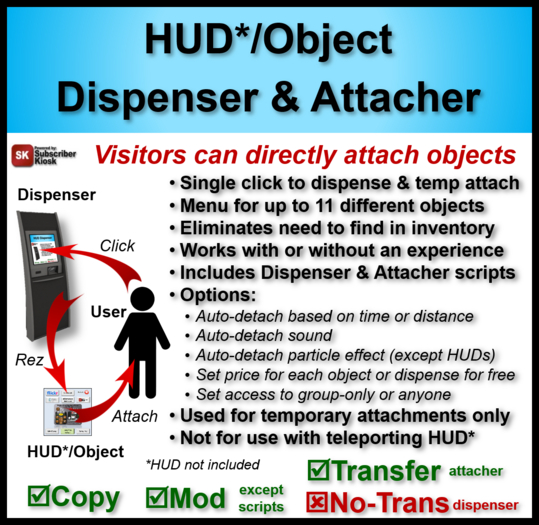

The HUD/Object Dispenser & Attacher enables avatars to directly attach your HUDs and other attachments (objects) without needing to take them into inventory first. Just put the !Object Attacher script in the objects and drop them into the Dispenser. When an avatar clicks the Dispenser, they will get a menu from which to select the object. The Dispenser will rez the object which will then ask for permission to attach. If the permission is granted, it will automatically attach. The Dispenser supports automatic rez-and-attach without asking for permission if you enable the "SK Products" experience on your land.
Permissions:
- Dispenser: mod, copy, no-transfer
- Dispenser script: no-mod, copy, no-transfer
- Attacher script: no-mod, copy, transfer
- Example objects and notecards: full perm
Normally, any avatar can use the Dispenser. You can also restrict it to group members only by putting the word GROUP in the Dispenser Description field. The Dispenser can work with or without a !Config notecard. The !Config notecard is only necessary if you want to enable any of the following features for any object(s).
- Set a price to be paid for the object.
- Set a time after which the object will automatically detach.
- Set a distance from the Dispenser beyond which the object will automatically detach.
- Enable an auto-detach particle effect (not applicable to HUDs).
- Enable an auto-detach sound.
This product includes a Dispenser and two scripts, i.e., !Object Dispenser and !Object Attacher. The !Object Dispenser script goes in the Dispenser. The !Object Attacher goes in each of the objects you want dispensed. When a user clicks on the Dispenser containing only one object, that object will be immediately rezzed. If there is more than one object in the Dispenser, the user will get a menu to select which object they want. The Dispenser menu supports selection of up to 11 different objects.
The rezzed object containing the !Object Attacher script will ask the user for permission to attach and, if granted, will attach to the user avatar at the attachment point and with the offset and rotation it had when previously attached.
If the land owner has enabled the "SK Products" experience on the land, and the user has not already joined the "SK Products" experience, they will get a menu with an option to join. Once joined, objects will automatically attach every time without asking permission. If the user declines joining the experience, they will get the default (non-experience) attach permission request.
If you place notecards in the Dispenser, it will also give all the notecards (except the !Config notecard).
NOTE: The Dispenser includes a non-functional Example HUD and Example Object, and an example !Config notecard. You can use the supplied Dispenser or make your own dispenser to which you copy the !Object Dispenser script and !Config notecard.
Restrictions and Limitations
=================
1. The object and its contents (e.g. scripts, notecards, textures, etc.) must have the Dispenser owner's transfer permission because it will be temporarily transferred to the user while attached. Objects that don't have the owner's copy permission can be used but will be deleted from the Dispenser when dispensed. Objects can have any next owner permissions, but they are generally not relevant because the user won't have it in their inventory.
2. The dispenser cannot be used to permanently transfer an object to the user. It will only attach and transfer temporarily and will be gone when it is detached. Does not apply to the Dispenser owner.
3. Particle effects do not apply to HUDs because HUDs cannot make particles.
4. Dispenser cannot be used to attach objects that teleport the user because temp attachments cannot teleport their owners. An exception is if the Dispenser owner is attaching a teleporting HUD/object to themselves.
5. Only one user at a time can use the dispenser. Their display name will be shown above the dispenser when they first click it. Once they dispense an object, or they cancel the transaction, or 60 seconds elapses without an interaction, the dispenser is released for other users to use.
6. A maximum of 11 objects can be included in the Dispenser. If more than 11 are present, only the first 11 will appear in the selection menu.
7. Object names must be no longer than 24 characters. This does not apply if there is only one object in the dispenser.
8. The !Object Attacher script can generally be added to objects that contain other scripts without interaction issues. However, it is possible some unforeseen conditions might cause adverse interactions. Contact Fred Allandale if you need help resolving them.
Ver el artículo en Second Life- Dispenses and attaches your HUD and other objects
- Includes Dispenser and example dispensed objects
- Includes dispenser and attacher scripts
- Used with or without Experience
- Options: payment/free, time and/or distance detach, particles, sound


![The Creative Publisher Kit [DL]](https://slm-assets.secondlife.com/assets/14099122/view_small/The_Creaative_Publisher_Kit_Box_Art.jpg?1463080980)


