
***********************************
COMBAT VAMPIRE Zero Cool
***********************************
A HUD will not make you a winner, the experience and a good team of multiple options will improve your performance.
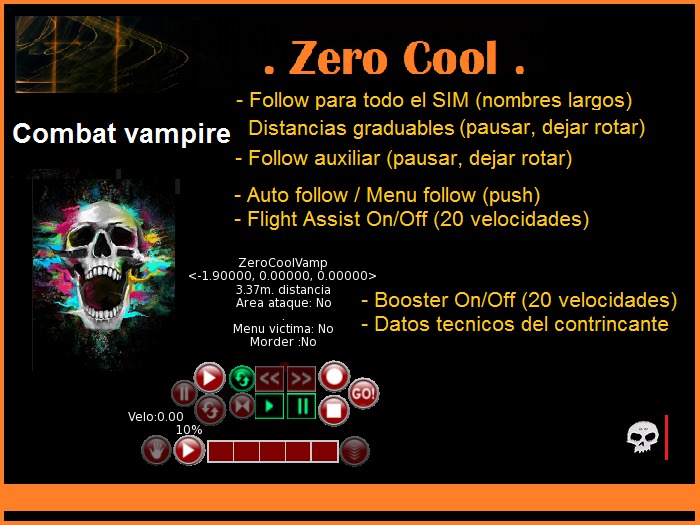
COMBAT VAMPIRE Zero Cool is a Follow with several options.
The HUD is divided by sections
A-> Three circles on the left side of the HUD
This set of buttons is a Follow for avatar
(by default it is a follower from behind)
- Capture names long names
- The avi to search will be in a range of 90 meters
FUNCTIONALITY OF THE BUTTONS
- PLAY-> Choose the avi or turn off the follower
- PAUSE-> Stop and resume the follow
- ROTATE-> Switch on or off so that it is not a follow from behind
B-> Three circles on the right side
Each one works individually
- CIRCLE -> Follow that pushes the nearest avi
- SQUARE-> Follow that pushes the avi you choose
- GO! -> Mini evader, constantly rising or falling from your place (if you mix it with a follow will have a rebound effect).
C-> Four squares with two circles on the left
(basically they are in the center of the HUD)
This set of buttons is a special Follow for avatar
(by default it is back)
- Capture names long names
- The avi to search will be in all the SIM
FUNCTIONALITY OF THE BUTTONS
- PLAY - Choose the avi or turn off the follower
- PAUSE - Stop and resume the follow
- >> - 0.50mt is approaching the avi
- << - 0.50mt away from the avi
- ROTATE - Switch on or off so that it is not a
follow from back
-> <- Swicht to approach the avi at 1.40mt away
**********************
SPEED Zero Cool
**********************
It allows to fly at different speeds, so it allows to walk / run
faster than normal in SL (depending on how you configure it).
Using the same speed bar you can have 3 options to move.
---------------------
Instructions for use
---------------------
It has 4 sections
PLAY : Turn the speed main motor off and on.
RECTANGLES : Allows you to graduate the speed from 10% to 100%
HAND : Turns the engine on or off at a slower speed.
CIRCLE to
the right : Allows walking or running faster preference to use
together with the hand to have a moderate speed
on the ground.
=============================================
FOLLOWERS INFORMATION
1.-Name of the avi
2.-Follow coordinates on the avi
3.-Distance from the avi
4.-Area of attack 180 Degrees
5.-To view the bite menu
6.-If you can bite or not
* Complete information only visualize when it is 26 meters or
less than avi
==========
*** TIPS ***
==========
1) Turn off the speed hud if you use the TP, if you do not the TP
will be given but it will bounce on the avi (then you can turn it on)
2) If for some reason everything or part disappears of some HUD,
change the group and refresh your annexed huds
________________________________________________________________
~*~*~*~*~*~*~*~*~*~*~*~*~*~*~*~*~*~*~*~*~*~*~*~*
GIFT--->: (Detector Vampire)
It allows to detect PV, the list of avi detected has 3 ways of presenting the detected ones (name, alias and name&Alias).
* -> Contact me for the delivery of this product. It will only be delivered to PV.
________________________________________________________________
~*~*~*~*~*~*~*~*~*~*~*~*~*~*~*~*~*~*~*~*~*~*~*~*
Zero Cool & Luna del Valle
Programadores
- Flight Assist On/Off (20 Velocities), Boost, Evader
- Follower (to capture long names, for SIM, allow pause, back&normal)
- Follower with personalized distance
- Technical info from avatar using this follower
- Detector of 3 types of RP players (vampires, wolves, ...)
