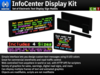
![[Gentek] InfoCenter Display Kit v3.0 [Boxed]](https://slm-assets.secondlife.com/assets/27891171/lightbox/VendorImage7%20-%20Gentek%20InfoCenter%20Display%20Kit.jpg?1605999860)


>>> YOU CAN GET A 10% REBATE BY WRITING A REVIEW ON THIS PRODUCT! <<<
If you write a review on this product after purchasing it, we will give you a 10% rebate on the purchase price of the product automatically, regardless of its contents and rating (as long as it is compliant with the Marketplace TOS and is related to the product itself).
PLEASE NOTE: If your delivery fails, PLEASE CONTACT US TO HAVE IT REDELIVERED instead of writing a review!
For more information, see below:
http://wiki.ntbigroup.com/index.php/Review_Rewards_Program
Why waste time with other noticeboards when you could have the real thing? Whether you're running a professional office, a prim factory, or a tourist trap shop, the InfoCenter Display Kit can really make your presence known, and get your message out.
The InfoCenter Display Kit includes four different models. Each model has standard and Duo variants - Duo variants typically quadruple text capacity.
InfoCenter Personal - 16 x 1 (2 LI) or 32 x 2 (5 LI) characters. Ideal for general commercial use, and includes a variety of animated graphics for stores.
InfoCenter Notice - 16 x 7 (8 LI) or 32 x 14 (29 LI) characters. The highest-capacity model, ideal for news & information. Also includes graphics for commercial & industrial purposes.
InfoCenter Highway - 16 x 3 (4 LI) or 32 x 6 (13 LI) characters. Best suited for overhead gantry installations on roads, but can be used for walkway or general commercial applications.
InfoCenter Matrix - 4 x 2 (1 LI) or 8 x 5 (3 LI) characters. A road sign display with many graphics for lane control, variable speed limits, hazard warning, detours, turn restrictions, and more.
All models, excluding the Highway, have a toggleable mounting bracket. All are resizable and modifiable (scripts excluded), and can be linked to other objects (as long as multiple signs are not linked together).
InfoCenter models run on our grid-renowned InfoCenter Manager software, allowing you to program them from anywhere - not just in the same region. Our intuitive web interface guides you through setting your message, which can include multiple individual "slides" for any message you like. Plus, you can group signs together and save message templates, making it super simple to network. The included HTTP API lets you set your sign (or anyone else's, with their permission) from an LSL script anywhere in-world, or (for advanced programmers) from any web server anywhere in the real world.
Ver el artículo en Second Life- Simple interface lets you design custom text messages using 8 colors
- Great for commercial storefronts & road traffic control
- Web controlled from anywhere in-world or out, w/ HTTP API for scripters
- Variety of graphics, from sales, to warnings, to digital road signs


Great Display For Dynamic Data

These are a wonderfully unique concept, and they're *everywhere* in SL for a reason: They're the best way to display ever-changing text/data, and a great-looking alternative to the usual texture text displays that tend to hit the uncanny valley between static signs and dynamic displays. These are dynamic displays that *look* dynamic, and they're very good at what they do!
The web configuration interface is also a very user-friendly way to manage them, and a lot better for that purpose than any in-world solution, but it does pose challenges for scripted interaction: While the API makes these a very powerful way to display data from LSL scripts, they're also very slow to update, which required a major rewrite of the project I originally bought them for. So, if you want to display dynamic data on them using the API, be aware that even the small signs will take upwards of a minute to process the API call, update the signs, and be ready for another API call. And don't plan on using large groups of these for any sort of time-sensitive or live data, because when an API call is made to a group, every sign in that group is updated consecutively, not concurrently, so a dozen signs can take several minutes to update, and they won't all have the same data at the same time.
The limitations of the API are an edge case that won't affect every user, and if you're not using scripts to update your signs (or if you didn't understand the previous paragraph), consider this a 5-star review, because are beautifully well-made signs with a user-friendly interface that will work very well if you just want to type into a box and have it display on the signs. And the scripts that drive these signs are remarkably robust, which I suspect is where the API slowness comes from; they may not be the fastest-updating signs, but they will almost never fail or display anything incorrectly, and that's a rare gem in the world of LSL scripting.
So Handy!
These are web based set up and very handy to do. Multiple colors, multiple size screens. I have used them for lots of things now from RP business, to Notices in an office. Worth the investment!
I love it!
The colors are so bright and clear, even from a long distance. I rarely get the words jumbled up when it switches to another screen unlike one that I had. The instructions are very clear, which helps.
I highly recommend
The best one in Second Life! Thank you very much!!!
Great :)
Probably the best system you can get.
Wie immer beste Qualität!
Ich habe schon viel gekauft bei GENTEK und bin auch wieder zufrieden. Super Qualität viel Handlungsspielraum. Nur muss man nun alles über eine Webseite machen. Das macht es übersichtlicher aber man muss es immer wieder neu einstellen wenn man es einpackt und wieder rezzt. Die alten Produkte wo man alles in die Notecard geschrieben hat fand ich ein wenig besser.
![[Gentek] InfoCenter Mobile v3.0 [Boxed]](https://slm-assets.secondlife.com/assets/27891173/view_small/VendorImage7%20-%20Gentek%20InfoCenter%20Mobile.jpg?1605999898)