KIRA STYLE - QUICK START GUIDE
1. Activation
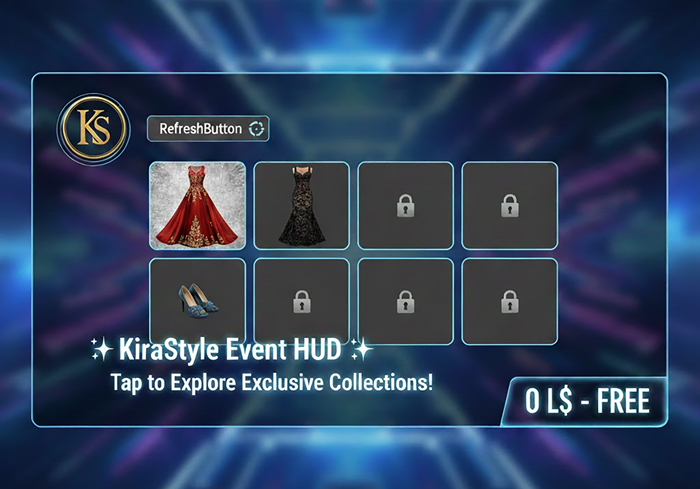
Wear the HUD from your inventory. You will see the KiraStyle Logo on your screen. Click it to expand the full menu.
2. Sync & Update (Refresh)
If you see "Coming Soon" images, click the REFRESH button. The HUD will sync with our server; please wait about 10 SECONDS to load all active products and news.
3. One HUD Forever
Do not delete it! Keep this HUD in your inventory. For future events and new releases, just wear it and hit Refresh to stay updated automatically.
4. Quick Links
- CLICK IMAGES: To receive products or teleport links.
- GROUP / MARKET / LANDMARK: Access gifts, online store, and our main location directly via chat.
KiraStyle: Always updated, always yours.
https://www.loom.com/share/5996ed1966dc497db5112ac9a50387cb TUTORIAL
See item in Second Life View Video »

This hud is really good to search event In secondlife so you see what you want to buy easily, Thanks for this creation we save
Today I want to recommend the KiraStyle Event HUD v1.0 because it is an amazing tool for anyone who shops at the Kira store. This HUD makes it incredibly easy to find current events, saving time and effort. Its interface is clean, stylish, and very user-friendly, even for new users. With just one click, you can access updated information, event locations, and important dates. Thanks to this HUD, shopping becomes more organized and stress-free. The KiraStyle Event HUD v1.0 is truly a must-have accessory that improves the overall experience and shows great quality and attention to detail.
Innovative and extremely useful!
Finally, a simple way to stay updated. The HUD syncs in just a few seconds and shows you real photos of the outfits. The real-time refresh feature is a great idea. Highly recommended!