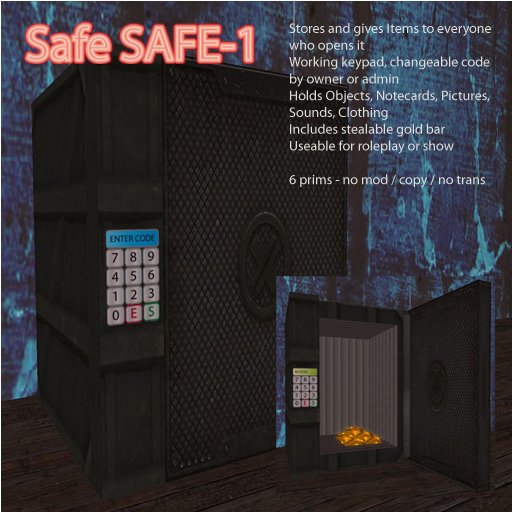

SAFE
The safe is made of Molecularly Compacted Linden Steel (MCLS) ... :)
So the only way to get to the contents is: enter the digits by clicking them on the keypad, followed by "E"
The safe will open if its the right number.
To close it, click somewhere on the keypad.
To clear and reenter in case of mistyping - click on the "Enter Code" field.
If the safe is opened - EVERYONE can do the following:
------------------------------------------------------------
1:
Drag items from your directory into the safe
- press and HOLD the ctrl-key
- now drag an item from your inventory into the opened save
- release mouse button
- release ctrl-key
- you get message if its accepted
It will accept: notecards, pictures, sounds, clothing and objects
Permissions:
"mod" or "no mod"
"copy" or "no copy" - see warning below !
"trans" - if it isn't transferable that makes no sense so only "trans"
2:
Get out items
- click on the safe (NOT the keypad - you remember? it will close the safe) you'll get a menu
- "get item" gives you the list of items - choose what you want
- "get all" - it will give you a folder "Safe" with the whole content
If you take an Item - that Item is removed from the safes inventory.
You have taken it out !
Warning:
It will work with "no copy" items but if the user doesn't accept the inventory offer,
the client crashes or SL gets a hickup - say "bye bye" to the item since you'll never see it again !
You have been warned !
Set the code:
---------------
ONLY the OWNER and avatars listed in the notecard as ADMIN can change the code
- click "S" on the keypad
- click the digits for the code, length is from 1 (are you serious?) to .. ummm .. nearly unlimited
so an easy to remember 50 digit code is no problem. :)
- click "E"
- it will tell you the code you just entered by IM
Set an admin:
----------------
- Edit the notecard "global.cfg" in the safe inventory
- add/change a line: ADMIN1=avatar name
- safe notecard and close edit window
- open the safe
- click
- there is a "read cfg" button - use it, it will read the new configuration
the "read cfg" appears only for owner and admins
only the owner and avatars with mod permission can change the notecard
Whatfor is that?
------------------
The safe is NOT to keep your stuff safe. The SL permission system keeps it safe. (more or less)
The safe gives an opportunity to steal your stuff if the code is leaked or blackmailed out of you.
So its for roleplay or just for some showtime.
I added a "stealable" goldbar to rez in the safe
have fun


Perfect for RP
Exactly what I wanted. It's a reasonable price, well-scripted, and doesn't look like crap! Highly recommended!
I plan to place random items in it, and create a Pick to challenge people to steal from me. The numpad code can be any length, so I can make it a simple 2-digit code, or a complex one with riddles to hint at the number.
I only wish it would keep track of who opened the safe, so I could track them later. But my security orb should narrow it down :)