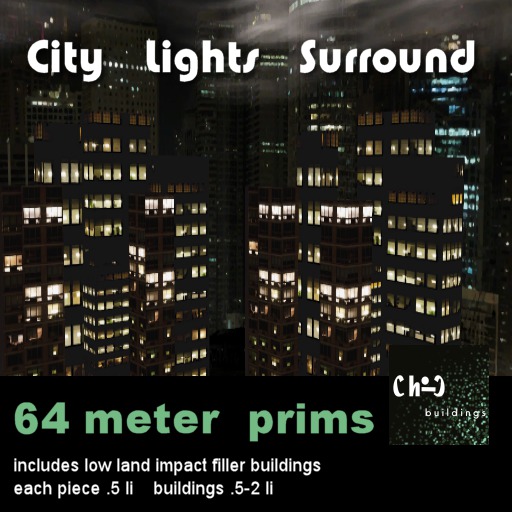


The City Lights Skybox Surround offers an expansive space for those on a prim budget.
Another specialty size made "on order" :D
Sometimes your parcel just isn't standard. For those of you with this issue, a do it yourself set which consists of four surround prims (sky with black walls, sky with transparent walls, land view with black walls and land view with transparent).
These can be resized and the texture pattern changed to fill the unstandard space you need.
This is a BUILDERS set. It is meant for those that feel comfortable changing sizes and texture repeats on prims. If this is not you, do not buy :D.
Add a plain black prim for a sky base as needed.
Includes the mesh buildings set. You can turn walls bright or not depending on your taste. Outside walls can be turned transparent to let in the sunlight if you like.
The set includes four differently sized (two different textures) skyscrapers. Add a city outside your favorite skybox or house window.
A deep base allows placement on uneven ground.
Closed version. Turn the outside face transparent for sunlight. Taking off the top prim will not save on land impact :D.
OTHER SIZES AVAILABLE - SEE RELATED PRODUCTS
Premium and custom textures are used throughout.
See a 64 meter example here: http://maps.secondlife.com/secondlife/Carbonara/22/25/2066
A full sim DEMO is also available.
Voir l'article dans Second Life- Prim
- Buildings
- City
- Night
- MESH


the finishing touch (though I wish they'd been my STARTING touch instead)
Oh my god, I wish I'd found these BEFORE I started on my single-parcel cyberpunk project. As it is, I'm glad I have these now!
I recently purchased and unpacked a gorgeous cyberpunk skybox apartment down on ground level, out on the Second Life Mainland. But I quickly realized I hated looking out of my expensive new windows onto others' ugly parcels. So I got to work lining my backyard with both mesh futuristic storefronts as well as "city-skyline" privacy screens/backgrounds (to give the illusion of my apartment being part of a "larger world"). I'm not much of a builder, so this was my most ambitious building project yet.
But once I had everything down, it didn't look right. I realized the illusion could only be completed by adding skyscrapers into the "middle distance" (otherwise it would just look like storefronts pressed up against a wall of "fake city"). Unfortunately, my parcel has an irregular shape, which I'd actually followed as I'd laid down all the other background elements. Argh!! So I rezzed a bunch of these awesome "City Lights" buildings, resized them into flat *wafers*, and slid them between my "city backdrops" and my "storefronts." OK, I admit it isn't very convincing from outsiders' angles but, from my own backyard, it looks freaking FANTASTIC.
I do know how to rez simple shapes and texture them, so, yeah, I guess I could've made my own "surround buildings." That's true. But these are a lot better than I could've ever come up with on my own. I also love that a lot of the textures are distinct from one another, yet "go together," so there's a certain uniformity to the aesthetic. I appreciate that these are totally modifiable, too, so you can set to "full bright" (important, if your windlights are set to "foggy night"), can resize the buildings (important, if you're a terrible city planner like me), and can even re-tint. These ready-made assets are awesome for "forced perspective," and they were just what I needed to finish my parcel!