1. Features
2. Installing the Product
1. Features
---------------
How to use
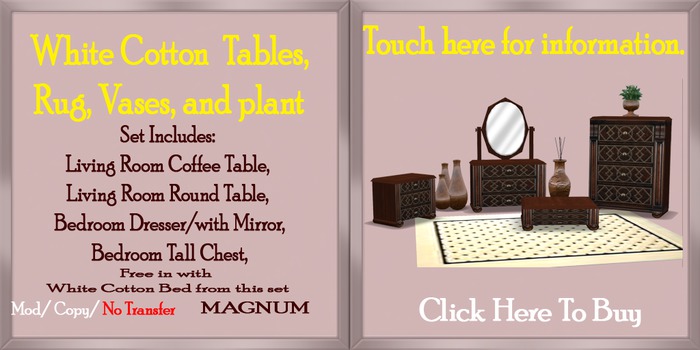
Set Includes: Living Room Coffee Table,
Living Room End Table,
Bedroom Dresser,
Bedroom End Table,
MAGNUM offer high quality unique furniture, Only the Best from SL’s Animators.
Name: MAGNUM - Tables
Modify: Yes
Copy: Yes
Transfer: No
IMPORTANT: Make sure you have building rights and enough free prims on the parcel before rezzing the product!
2. Installing the Product:
---------------
Installing MAGNUM - Tables:
After purchasing a MAGNUM - Tables, you need to follow the steps below to start using it:
1. Look for the Item Box in your inventory, it will be in your "Objects" folder, and it has the same name as the MAGNUM - Tables
2. Drag and Drop Box on the ground. (You need to be on a sim where you are allowed to build).
3. Right Click and select open. The bottom left of the Dialog box select copy to inventory.
4. Drag and Drop Box named MAGNUM - Tables on the ground.
5. In edit mod move to where you would like. Rotate and move it if needed, but DO NOT stretch it or edit the contents
6. When it’s positioned, deselect the MAGNUM - Tables.
Enjoy :)
I hope you enjoy your new, MAGNUM - Tables, feel free to contact me if you have any questions!
- MAGNUM –
Lisa Petrolhead (Creator)
See item in Second Life- Living Room Coffee Table
- Living Room End Table,
- Bedroom Dresser,
- Bedroom End Table,
- MAGNUM offer high quality unique furniture
