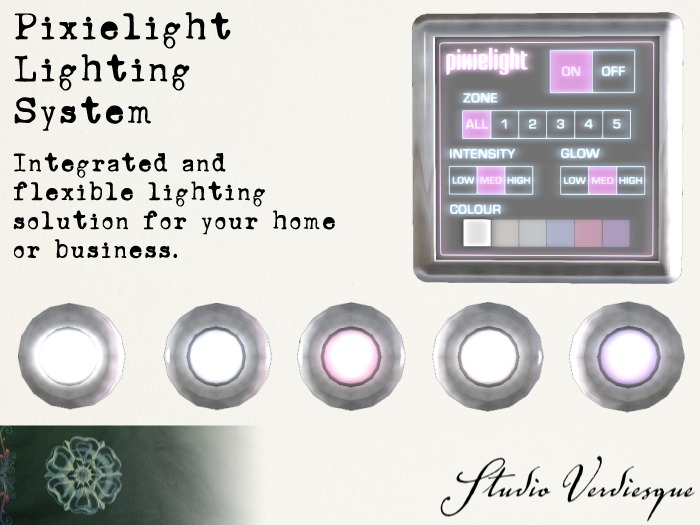

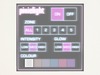
I introducing... the Pixielight Lighting System from Studio Verdiesque! A centrally-controlled, 5-zone, configurable, extendible lighting system for your home, business, or any other place you'd want to have integrated, attractive and most of all - controllable and configurable lighting. Tired of walking around and turning on and off all your various lamps and lights? Wish you could set it just right for all the rooms in your house and turn them on with a tap of a wall panel? Now you can. Easy to set up, easy to customize, a breeze to use.
//WHAT'S IN THE BOX
Included with every purchase are:
- ONE copyable Pixielight controller panel which can be mountable anywhere (use multiple panels to control from anywhere, or multiple panels on different channels for 5 more zones each)
- FIVE copyable Pixielight Pucklights preset to the five zones on the panel (make as many as you like to bathe your home in light)
- ONE copyable Pixielight client controller script to throw into your existing lamps (see below)
- Backup settings notecards for controller and lights
- This manual and the policies notecard
// FEATURES
- Easy to set up, easy to configure, easy to use
- Minimal, intuitive touch panel interface
- Sleek, futuristic design in brushed aluminium and glass with vibrant, glowing interface
- Independent control of 5 zones of lighting (per channel, can be extended, see below)
- 100m range
- Synchronized control amongst multiple panels
- Can be used with the supplied Pixielight Pucklights or with your existing (modify) lamps (see blow)
- 3 Light intensity settings, 3 bulb glow settings, all configurable
- 6 configurable light colours (use your own favourite colours!)
- Comes preconfigured, works straight out of the box
- Notecard configuration for customizing (if desired)
- 100% original meshes and textures with materials.
- 100% original user-interface and user experience design
// LAND IMPACT
- Pixielight Lighting System Controller is LI 3
- Pixielight Pucklights are LI 1 each
- Linking controllers to anything will break them
- Linking the pucklights together is possible and they still work, but no gain in land impact
// USE
- Rez your Pixielight System Controller
- Rez your Pixielight Pucklights and place them as desired
- Enjoy! Just click on which zone you wish to control, then click the desired setting.
- OPTONAL: configure custom settings in notecards in the lights and controller
- OPTIONAL: modify your existing (with mod permission) lamps to work with the system
// INTERFACE
Your Pixielight System Controller is designed to have a minimal, intuitive interface with enough options for a variety of settings, while simple enough to not bog the user down in details. The controller is divided into five sections with a hidden "reset" button in the form of the logo (more on this later). Simply click on the desired button, the intended function will operate and the display will refresh, highlighting the current setting. Each command is performed in the context of the zone setting, allowing you to set on/off state, intensity, glow and colour independently for the five zones or all five at once. If the light(s) are off, any change in these settings will turn them on, and the setting will be remembered until changed again or the lights/controller are reset.
// CUSTOMIZATION AND MODIFICATION
I've designed the Pixielight Lighting System to be as flexible as possible while still being relatively foolproof. For the more advanced user, I've included many options to configure and mess with in the settings notecards in both the controller and the lights which I will detail below. In terms of modifying the actual devices, the controller is mod but DO NOT stretch, resize, link or de-link the device, or change the texture parameters of the interface panel. Such actions will break the device. As always work on a COPY as I will not replace damaged devices through modification. The lights themselves are modify to edit to your liking (though the script remains no-mod, which makes it say it's no-mod in inventory, but it actually is). So feel free to resize/retexture/whatever the lights however you like. Again, work on a copy.
The notecards in both are heavily commented and each setting is explained as well as how to format the setting so that the devices can read them properly.
// MAKE YOUR OWN PIXIELIGHTS
As mentioned above in the features section, you can turn pretty much any lamp or light fixture into a Pixielight-capable light source. Provided that the light you have is modify, simply drop in the client script and the corresponding config notecard. Then you must configure what link in the linkset (if your light is a linked object, 0 if it isn't), and what face on that object is your "bulb".
- Easy to set up, easy to configure, easy to use, intuitive interface
- Sleek, futuristic design in brushed aluminium and glass with glowing display
- Independent control of 5 zones of lighting, 100m range
- Can be used with the supplied Pixielight Pucklights or with your existing lamps
- 100% original mesh, textures, materials, scripts, UI and UX
