
Introduction:---------------------------
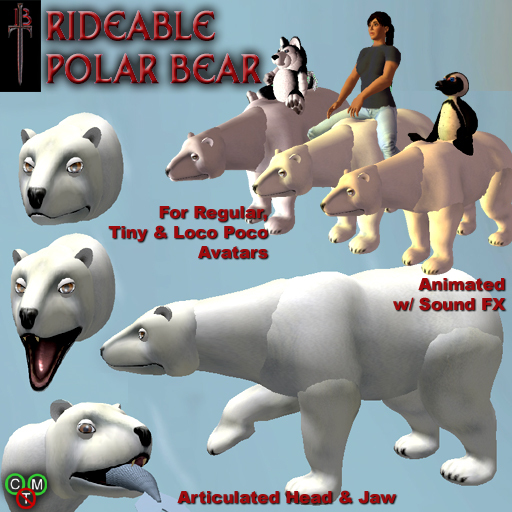
This Rideable Polar Bear works with normal avatars, as well as Tiny and Loco Pocos! Just select your avatar type when you first wear it.
Also compatible with special saddles from Bloodsong Termagant, like the Turbine Jet Engine.
Instructions:------------------------------
1: Turn off your AO *
2: ADD the three parts of the Polar Bear to your outfit. Make sure you ADD, not Wear, so they go on properly and don't remove any of your skirts or tails or anything.
3: If you need to reposition the Polar Bear...
3a: Click the Head and go into Low Lag mode.
3b: Right click and Edit the Head.
3c: Shift-click the Body so both Head and Body are selected.
3d: Move/Size/Rotate both as a unit. (Tip: Turn on "Edit Axis at Root" if your viewer has that option.) **
4: If the Polar Bear is too high above the ground or too low in it, click the Rider Hud and select HeightControl from the menu.
That should be it! Head out on your Polar Bear.
(*) If you have a Tiny avatar, make sure you don't have any extra hidden AOs turned on (ie: in your Body and your HUD). You may also need to disable any Tiny Lock animation you have on.
(**) If you have a Loco Pocos avatar, click the Polar Bear Head and select "FlipHead" from the menu to get it facing (and staying!) the right way.
Controls:----------------------------------
Click the Bear's body or head for controls such as sound volume and LowLag mode, and also to interact with your Bear.
Click the HUD bar to control your avatar's animation, including height setting, what type of avatar you are wearing, and if you need to reapply your riding pose.
The HUD also has a button to turn the AniMotion on and off. When ON (Default), your avatar will move as you ride. When OFF, your avatar will still be riding, but will stay steady and level.
Enjoy!
Voir l'article dans Second Life- Works with Normal Avatars, as well as Tinies and Loco Pocos!
- Animated Head, Jaw, Legs
- Animated Walk, Run, and Jump avatar motions
- Interactive: feed and pet your bear!

