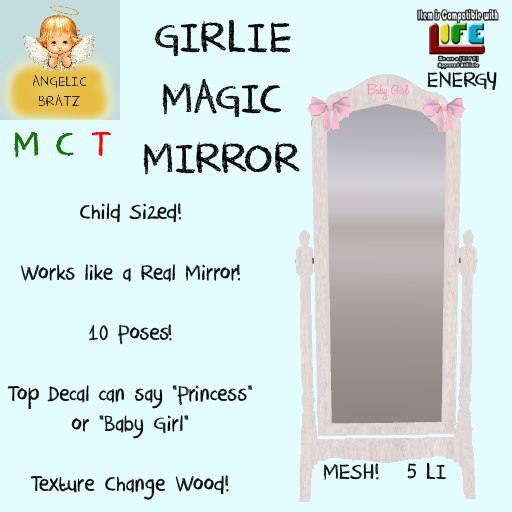

* Child Sized
* Works like a Real Mirror
* 10 Poses
* Texture Change Wood
* Decal can say "Baby GIrl" OR "Princess"
* [ L I F E ] Energy Enabled
* Mesh! 5 LI
* Matching Mommy Size Mirror @ Absolute Bratz
The Girlie Magic Mirror was made using a ToddleeDoo Kid avi. The Girlie Magic Mirror does include an Offset button to adjust your height in case your feet are in the ground or floating, so it should fit well with most child avatars such as Regular Kids, SMB, TweeneeDoo, ToddleeDoo Kid, ToddleeDoo Baby and Totsipop Tot and Tween.
*~*~*~*~*~*~*~*~*~*~*~*~*~*~*~*~*~*~*~*~*~*~*~*~*~*~*~*~*~*~*~*~*~*~*~*~*~*~*~*
Q. My Girlie Magic Mirror won't move my camera angle even after i have hit Escape several times. Heeeelp!
A. Check to see if you are wearing a scripted item that moves the default camera angle. Try taking off this scripted item (Most likely the free BabyCam that i give out) and then sit on the Girly Magic Mirror and hit Escape.
i know many of you who are used to wearing the BabyCam will not want to give up being able to use it, so below are instructions on how to get your camera angle to look like you are wearing the BabyCam scripted attachment. These instructions are based off of using the Firestorm Viewer but should work for most other viewers as well.
1. Under "Advanced" on the top bar, select "Show Debug Settings" OR hit "Control+Alt+Shift+S" all together. If you do not see "Advanced" up on the top bar, hit "Control+Alt+D" all together to get the "Advanced" menu to appear.
2. In the "Search Here" bar above the long list of words that probally make no sense, type in "FocusOffsetRearView". You will see values for X Y Z
3. In the X spot put in "0.300". In the Y spot put in "0.000". In the Z spot put in "0.400". You should see your camera start to move around as you do this. If you do not, hit "Escape" to reset your camera angle.
4. In the search bar where you can "FocusOffsetRearView", delete all the letters and type in that bar "CameraOffsetRearView". You will see similar X Y Z spots like you saw in steps 2-3.
5. In the X spot put "-2.700". In the Y spot put "0.000". In the Z spot put "-0.050".
6. Your camera angle should look like the BabyCam now. You can always tweak with the X Y Z values if you want to get a more custom camera angle. If you have completely screwed up your camera angle, you can always use the "Reset to Default" button that is on the lower right corner of the Debug Settings window.
Try sitting on the Girlie Magic Mirror again and hit "Escape" if your camera angle doesn't move. It should work now. If it does not work, it is quite possible that another scripted item you are wearing is controlling your camera angle. The ToddleeDoo HUD does have an integrated BabyCam inside it. Be sure that the Camera button that is under Tools is red, meaning that it is off.
*~*~*~*~*~*~*~*~*~*~*~*~*~*~*~*~*~*~*~*~*~*~*~*~*~*~*~*~*~*~*~*~*~*~*~*~*~*~*~*
Does this Girly Magic Mirror look familiar? Maybe you seen an adult version? Well you're not dreamin! Angelic Bratz is a sister store to Absolute Bratz. Any product that is made by Angelic Bratz and looks similar to an Absolute Bratz product is perfectly ok. Angelic Bratz is not copybotting any products made by Absolute Bratz. Any of the same textures, scripts, sculpts and animations used in Angelic Bratz products that Absolute Bratz uses has been user licensed (OR repurchased by Terisa Tizzy) by each content creator to be passed to Terisa Tizzy from melody Swashbuckler with the sole use of using the animations, scripts, sculpts and textures in products sold by Terisa Tizzy under the store name Angelic Bratz.
See item in Second Life