

*Due to RL health issues, the inworld store has closed. All {ACD} items have been retired to the marketplace.
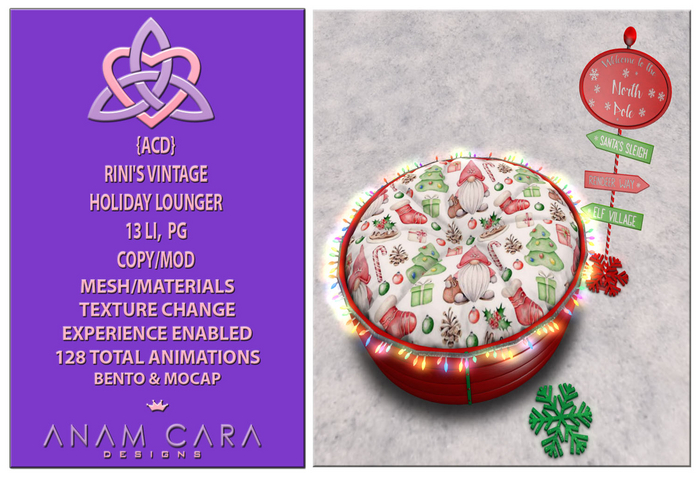
Loads of cuddles & even some F/M/F friend sits for just hanging out! Tons of cute holiday textures as well!
13 LI
Copy/Mod
Mesh/Materials
Texture Change
128 Total Animations (Bento & Mocap)
20 Female Solo
15 Male Solo
6 F/M/F Hangout
12 Massage
75 Cuddles
Bed: 5 LI
17 Cushion Textures
11 Base Textures
11 Strips Textures
5 Screw Textures
Christmas Direction Sign 3 LI
11 Snowflake Textures
(I've added 3 kinds of snowflake bases. Fast blinking, slow blinking & no blinking & No Snowflake.)
Snowflake 3 LI
11 Snowflake Textures
(I've added 3 kinds of snowflakes. Fast blinking, slow blinking & no blinking.)
Light Ring 2 LI
Light ring is optional, it isn't attached.
(There are 4 types of light ring, Flashing Colors, Flashing White, Solid Colors & Solid White)
To position the light ring, go into edit on the bed, click Object & then hit the C under position. Then click on the Light Ring, go to Object & click the P under position. It should snap the Light Ring into place.)
*There are no pose balls, just right click & sit to get animation menu. To adjust poses just click adjust & then pose & move until you have the position you want & hit save. Make sure to pick up that version of the bed so you have a fixed copy in your inventory.
*This item(s) uses the materials feature. You need to enable Local Lights & the Advanced Lighting Model in your SL graphics settings & have a light source nearby like a lamp or fire that throws off light. Please make sure to enable those settings, if you don't & the item doesn't look like the photo's it's because of that, not because of a problem with the item(s).
*The item(s) is experience enabled, see accompanying note card for instructions. Basically, in this case a prop from a piece of furniture will be able to automatically attach to you, but only if YOU agree to it & it only takes allowing it once, it helps make things more immersive. See accompanying note card for instructions on how to set it up.
*Changing the size of mesh can impact the amount of prims it takes up and will also mess up animation positions.
See You on The Grid,
Stormm Firecaster


