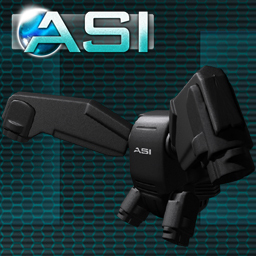

ASI Dart JJ320
• Fly to 70 meter heights and use hover mode or turn it off.
• 4 directionl dodges forward, left, right and backward or
choose just forward or turn dodges off.
• Adjustable options like 10 or 15 meter dodge distance,
full or half fuel capacity.
• Highly detailed and sculpted with minimal map sizes
helping graphics lag.
• Low prim, 13x.
• Modify permissions, edit it how YOU want.
• Fits small to large avatars.
• Built to match most combat sim regulations.
• Animated dodges and flight.
• Sleek SciFi look.
• Free updates.
**********************************************
After making sure that the jump jet is attached, Click it and you will open the main menu, from here you will be able to access the following:
***Main menu***
Jet Fuel: toggles between a half and full fuel cell to power the jump jet.
Dodge Distance: toggles between 10 and 15 meter dodging distances.
Dodge In Air: disables and enables if the jump jet will dodge while you are in the air.
Click Menu: disables and enables clicking of the jump jet to access the menu.
Dodge: disables and enables if the jump jet can dodge.
Fly: disables and enables if the jump jet can fly.
L,R,B Dodge: toggles between dodging just forward or being able to dodge Left, right and backward.
AO: disables and enables the animations.
Reset: resets the jump jet.
*** Controls and other commands****
Double tapping E or Page Up and holding the key on the second strike will set the jump jet to fly upward using fuel in the process, the maximum distance the device can take you is 70 meters. Letting go of the key will stop the flight and let you fall.
Holding down C or Page Down while you are in flight mode which is done by the above steps will set you to hover mode which does not fly upward but at the level it was at when engaged. Hover modes uses less fuel and is more easy to navigate when you reach the required level of height, letting go of C or Page Down will go back to normal flying if still holding E or Page Up.
Double tapping E or Forward arrow key will make the jump jet dodge in the direction your camera is facing. If L,R,B Dodge is enabled you can double tap the other direction keys to dodge left, right and backward relative to your camera.
Typing "menu" over channel 151 will open the main menu.
***Additional Notes***
Please note any button name is a command (Some buttons cut the end of the text so it might not be the full command!), and can be given on channel 151, commands are not capital sensitive.
The jump jet uses fuel to fly, it can be set to 50 or 100 you use fuel in flight you will see red text counting down in flight mode, hover mode uses it more slowly than normal but you can't move upward only hover about in X,Y directions, you will see light red text in hover mode. when you get out of flight mode the jump jet will slowly restore its fuel showing it as slightly visible text that will diapered once it reaches full capacity.
A unique notifying sound plays when the dodge cool down is finished and when the refueling counter has reached 100.
This jump jet has a basic AO so it will play animations for jetting up, forward, left, right and backward.
Some combat sims might now allow certain functions like to fly, to dodge or to dodge at 15 meters etc, read the sim rules and either avoid using disallowed features or disabled them in the jump jet, you have the options to, so you have no excuse!
The model is modify permission so you can customize and resize it manually.
Please contact Dingo Nikolaidis if you have any issues, updates are free and for life.
**********************************************
Copyright Ambo Science Inc. tm, 2010.
All and any concepts, sculpties, textures, scripts and content of this product are the property of Ambo Science Inc. & Dingo Nikolaidis. Redistribution of the product in part or whole is prohibited.
**********************************************


awesome! redeliver please
I loved this, please redeliver
Works great.
I love this, since it works great for combat sims. I quite like it. It's very handy in No Flight sims if I need a bit of vantage, and to move quickly away.
Beautiful
It looks stunning, works perfectly, and does exactly what it says it does, every single time. Modding it is easy too.
Really Happy with the product

It fits with the theme of my RP Sim, and provides fast dodges in combat. That being said however i'd love to see just a normal flight mode with a flight feather with it, so that i could fly in Fly sims and still have the jets working. It was obviously designed for Combat Sims though, and I give it 5 stars for combat works flawlessly and it's unfair.
Well, after looking at the price tag, I have to admit I was a little leery of this purchase. That said, I have to admit to a sense of total satisfaction with this product. Flight in no fly, useful dodges with a clear notification tone, fair fuel system, and a nice subdued design means I don't feel like a billboard wearing it.
My only issues would have to be that I cannot see the fuel level in mouselook, and that hover is a bit clunky to execute, though since the pack works best for jet hopping anyway, this isn't much of a problem for me.
5/5 stars for being exactly and totally what it advertises itself as.