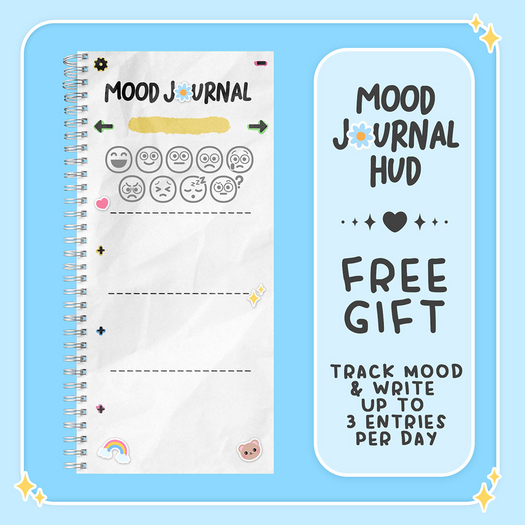

A free mood journal HUD. This journal is also available in a different theme, along with many great mental health resources, inworld at Circle Mental Health.
http://maps.secondlife.com/secondlife/Nautilus%20-%20Anath/80/114/3002
Congrats on starting your mood journal! Journaling is a great way to keep track of your feelings, and even see patterns in your moods as time goes by.
✏ QUICK START ✏
Click the + signs to add text entries. Click the emojis to track your mood! Touch the arrows to page through your journal, or click the date itself to jump to today's date ore enter a custom date.
✏ INSTRUCTIONS ✏
For each day's page, you can enter up to 3 text entries (up to 224 characters each), and select any combination of moods. Your journal is saved automatically as you add to it.
Using the arrows on either side of the date, you can page through your previous entries (or add a note in a future entry!). To jump back to today's date instantly or to enter a custom date, click the date itself. In the settings menu, there is an option to change the date format between MM/DD/YY and DD/MM/YY.
There are 9 emojis, and you can click any combination of them each day.
These emojis can be interpreted in any way you like.
Here is a suggested interpretation, starting from the top left. :
Very Happy, Happy, Neutral, Sad, Very Sad, Angry, Anxious, Tired, and Confused
To add a text entry, click the + sign next to one of the three text sections. A dialog menu will pop up for you to type in up to 224 characters (spaces and punctuation do count towards this). If you'd like to overwrite any text you've entered, you can click the + sign for that section and rewrite it in the new dialog box. (Remember, you cannot get your previous text back after you overwrite a section.)
Each journal can store over 130,000 bytes of total data, however in the unlikely event that you fill up all the data in your journal, it is recommended that you unpack a new copy and continue from there, renaming each journal to keep track.
Please note that in the settings menu, there is also an option to clear ALL entries from your HUD. Before choosing this, please make sure you truly want to erase your journal, as your data can NOT be retrieved once deleted. It is recommended to make a backup copy before taking this action.
Crashed? While this HUD saves your data regularly, when a crash happens you may end up losing recent changes. The best way to prevent this is to detach and reattach every now and then, as a safety precaution.
Second Life の商品を表示- Track Moods
- Add up to 3 text entries per day.
- MM/DD/YY and DD/MM/YY options.
- Private! Data is ONLY stored in your HUD (using linkset data), not a database.


Amazing!
Thank you so much! If you charged 1L for this, we could gift it to others. It's worth so much more!
perfect!
I don't normally rate a post, but this deserves 5 stars. It helped me a lot to write and release my moods.