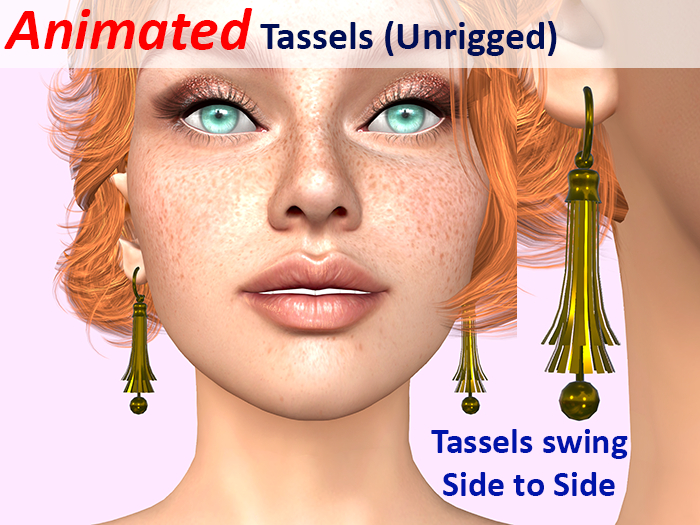
Configurable, Animated Tassels
Unrigged and adjustable - works with any head/body
Please watch the video and try the demo.
THIS IS THE EARRING pack only: Other tassels available separately.
Buy the fatpack and review on the MP, and I'll send you a matching animated 'down there' tassel for free!
The blurb below is about all the available types...
An amazing variety of combinations and effects can be set using the HUD.
High Points:
> Made for PBR but with automatic fallback so that non-PBR viewers see something similar (PBR is much better for metals!)
> Highly configurable via an extensive HUD.
> PBR material override controls on the HUD for Metallic, Roughness, Emissive tint and Glow.
> One HUD to rule them all: works with all the animated tassels simultaneously.
> MOD perms to so you can rez, remove scripts, and DIY everything if you want.
> Up to eleven individually editable faces, selectable on the HUD.
> Eight base textures; three with preset white surfaces for tinting (matt, brushed and polished).
> Four surface effects for added sparkle (or smooth and shiny).
> Earrings are adjustable and resizeable with the viewers edit tool.
> 100% my own work in mesh.
HUD Instructions:
All effects on the HUD take effect on the selected faces; that way you can change each face individually. The HUD changes both sides (Left/Right) and all worn tassels together, so if you want to make them different, you will need to wear just one, change it, take it off, wear another, change it, take it off, etc. until all are done.
Enable parts to be changed by clicking their button to check them; click again to disable.
The Hide Clamp button does exactly that, and brings it back again on another click. Those parts will still be affected if selected, even if they are currently hidden.
Once you've selected which parts, you can tint, apply a base material, change PBR material properties, or reset all of that using the Reset buttons.
To tint, just click the colour map. Use the slider too to set the luminosity; if your colour is always white or always black, you have that slider at the bottom or top. Changes happen instantly. You can also click the colour swatch which displays the most recent colour picked in the HUD to send that to the parts again.
The PBR overrides (Metallic, Roughness and Glow) are set from 0-100, with '===' being displayed if reset to the material's default. Use the up/down chevrons to set the number; the single chevrons are +/-1, double chevrons are +/-10.
Emissive Tinting is done by enabling the Emiss button. When checked, tinting is sent to the PBR Emissive tint instead of the material tint. Emissive controls how much that colour is shown regardless of the lighting. If you set a bright Emissive tint (using the Luminosity slider), it will completely override the material colour/tint. Use darker Emissive shades and it sort of mixes, depending on ambient light, and can give some spectacular inner glow-like effects. the Glow setting works with the Emissive; brighter Emmisive means more glow from that bit. No emissive means no glow. Sounds complex, but you'll get that hang of it. There are some great effects to be had with PBR... experiment!
Swing rate is adjustable and can be turned on/off with the clickable ramp. Note that turning off occasionally causes all faces to show; it's a viewer bug. Just click on/off again to fix it. Also, sometimes it will not seem to animate for a brief moment when you first see it in the viewer. Again that's a viewer thing. It only animates such things when they are in view (nothing we can do about it). Someone else looking at them will be seeing them animate. It's just that first moment when they come into view.
Notes:
Please note that the items appear no-mod in the inventory, but only the scripts are no-mod. You can edit them when rezzed or worn. Rezzed is much easier and you can make more changes like renaming. The Blinn-Phong fallback is basic colouring; the PBR effects cannot be translated. It's better than nothing (or grey) for people using non-PBR viewers, but PBR is much better.
The no-mod DEMO version only has a selection of the items. The HUD still works fully in the DEMO.
Video anzeigen »- Swinging animation on all tassels
- Extensive PBR HUD for Customization
- Matches the full Tassel set
- Modify permissions (except scripts) so you can DIY
- Earrings are unrigged to allow adjustment


