

NanoGunk Bali Dream - Tall Crest Wave Rezzer
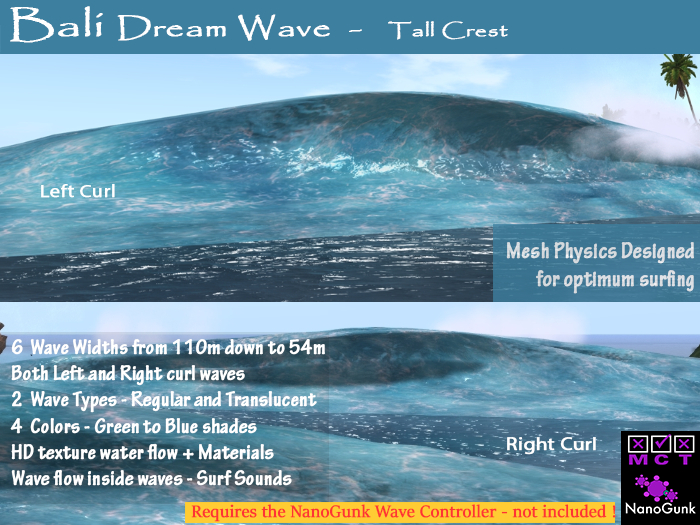
✱ Package includes 1 wave rezzer. The rezzer will rez both left curl waves & right curl waves OR alternate between them.
These surf waves are running in the NanoGunk sim, please come and surf them in-world if you are not sure you'll like them.
� These Surf wave are controlled by the "NanoGunk Wave Controller HUD", purchased separately !
Nothing happens without the controller Hud.
These waves have the following features:
✱ Wave Widths:
#6 = 110m,
#5 = 100m,
#4 = 96m,
#3 = 76m,
#2 = 64m,
#1 = 54m
The wave widths are selected in the NanoGunk Wave Controller HUD.
✱ 2 Types - (1) Regular and (2) Translucent - the translucent waves does not have any spray to prevent alpha sort issues.
✱ 4 Wave Colors
✱ This wave has animated water flow 'inside' the wave - it is double sided - if at times your camera moves inside the wave you will see a pretty inside wave flow view, not just empty space.
These waves has been designed with careful attention to how the physics affect the surfing of the wave, this means your board will sink into the wave more and less in different places, the leading edge of the curl lets you fall through like a real wave. Re-entry on the sides of the wave are forgiving, letting you have a fun surfing time.
- Soft Waves ™
Like all NanoGunk waves they feature HD textures and materials.
Quick Start:
1- Attach the NanoGunk Wave Controller HUD (separate one time purchase)
2- Go to the location where you want the wave to start. From inventory, Drop a Wave Rezzer on the Linden water.
3- Click the Wave Rezzer you just dropped to connect it to the HUD.
The wave rezzer top will turn blue, AND it will rez a red Marker next to it.
4- Edit the position of the red Marker to where you want the wave to end its run.
As you change the red Marker location the HUD will update and show you the distance from the wave rezzer to the red Marker.
!!! Remember that you may have to fly back and forth to ensure you are seeing the rezzer and or Marker.
5- In HUD SETUP click the REZ WAVE NOW to see a test wave. Edit rezzer and or Marker positions as needed.
You don't have to wait for the wave to complete a run - rezzing a wave will delete any previous wave.
Adjust wave settings on the hud as needed, observing test waves.
6- Click the RUN tab at the top and click START REZZING.
Both the Wave Rezzer and the red Marker expects to be used on linden water - they automatically set their heights on the water. The Wave Rezzer will always point toward the Marker, you do not need to rotate anything.
For further help and or information, please refer to the Wave Controller HUD notecards.
- Soft Waves ™
Second Life の商品を表示


