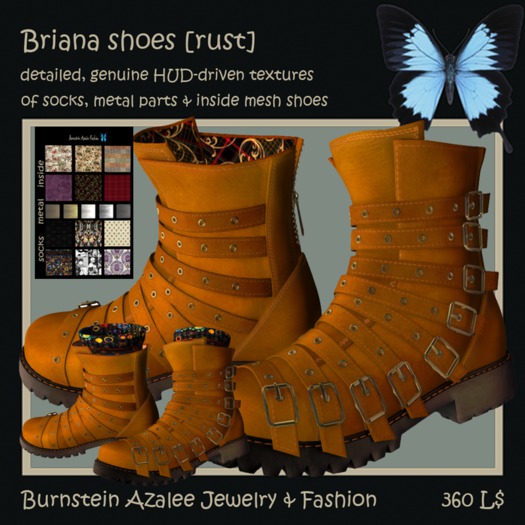

BRIANA shoes unrigged mesh from Burnstein Azalee Jewelry & Fashion
_________________________________________
* leather, metal, fabrics & rubber
* detailed, genuine, original textures
* conforms to the natural movement of your avatar, just like in RL
* low lag
* resizable unrigged mesh shoes
* resizable unrigged mesh socks [tops]
* shoe base
* alpha for shoes & socks
* HUD for socks, inner & metal parts of shoes
Perms: copy
Only 1 script
To get a free demo please visit us in-world (URL below).
If there are any questions, don't hesitate to contact me.
*********************
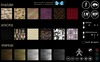
Briana shoes HUD gives you the ability and choice to:
(1) Change 5 metal textures,
(2) Change 6 inner shoe textures,
(3) Change 6 socks textures,
(4) Change full bright on -- off,
(5) Change shininess (none, low, med, high) on metal parts,
(6) Change glow (best option is 0.01),
(7) Remove socks by clicking on eye icon,
(8) Change size of your shoes by clicking "-" or "+" of the resize option; the HUD gives you options to resize or stretch (X,Y,Z) for all prims of the piece of jewelry at 1, 5 or 10 percent smaller or bigger and to restore to default size by clicking on the arrow icon,
(9) Obtain LM to Burnstein Azalee Jewelry & Fashion Store @ OMEN Island by clicking on "LM" button,
(10) Obtain Burnstein Azalee Jewelry & Fashion marketplace page by clicking on "MP" button, and
(11) Obtain the Briana shoes Notecard by clicking on the "I" (information) icon
button.
*********************
TIPS:
Shoes sunken in the ground?
If your shoes are sunken into the ground, you can solve this by going into appearance and putting a higher value at Hover (bottom at Body tab).
IMPROVE THE APPEARANCE OF MESH:
1. Open Advanced menu by going to Preferences > Advanced > check the "Show Advanced Menu" box
2. Go to Advanced > Debug Settings
3. In the Debug Settings window, choose "MeshMaxConcurrentRequests" from the drop down menu.
4. Change the value from the current number to 100 or 150.
OR:
1. Open Fast Settings Panel
2. Go to Obj. Detail
3. Change the value from the current number to 4.000
*********************
BRIANA is Feminine form of BRIAN. The meaning of this name is not known for certain but it is possibly related to the old Celtic element bre meaning "hill", or by extension "high, noble".
VARIANTS: Breanna, Brianna, Breana, Breann, Breanne, Brianne, Bryana, Bryanna, Bryanne
*********************
We use the customer reward system in our in-world store, which allows you to get credits by purchase (up to 10 % of price). Additional to that, we also give 25% discount for group members (Burnstein Azalee Fashion & Jewelry). Simply join group to benefit from it. This doesn't count for marketplace sales. Also make sure to join the group for gacha events and exclusive group gifts.
*********************
* Purchases of any Burnstein Azalee Jewelry products grants you license to use it in the Second Life® world.
* All rights are reserved. PROHIBITED is any reproduction and/or distribution, even partial, on Second Life® and in others Grids
* Our Products are licensed to be used within Second Life® world only. IS NOT ALLOWED to export them in other grids.
Infringements of these terms of use will be subjected to DMCA (Digital Millennium Copyright Act), i.e. United States copyright law that criminalize production and dissemination of technology, devices, or services intended to circumvent measures that control access to copyrighted works.
Burnstein Azalee Jewelry & Fashion products can be found in-world @
See item in Second Life


