![[CC] Twinkle Ivy Fatpack](https://slm-assets.secondlife.com/assets/31816779/lightbox/Twinkle%20Ivy%20Add%20Fatpack%20SL.jpg?1657562659)
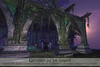
The ivy vines swayed softly in the sunset fiery light. As the sun kissed the horizon the leaves started glowing with a light of their own, and little sparks of light surrounded the rich foliage...
Valley Sunset
The Apprentices Journal
*****************************
CONTENTS:
All Contents are copy/mod, but scripts which are only copy. Land Impacts are at rez size, resizing, as with all mesh, will change Land Impact, though you can reduce land impact by linking several vine patches
together, which is strongly encouraged when using more than one patch (see moder notes for further details).
Large Patch - 4 LI. Large patch for flat surfaces
Small Patch 1- 2 LI., Small patch for flat surfaces
Small Patch 2- 2 LI., Small patch for flat surfaces
Tree/Column Patch- 2 LI. Convex Curved Patch suitable for columns, trees and other cylindrical surfaces
Vine Patch 1- 2 LI. Hanging vines patch, suitable for hanging effects
Vine Patch 2- 2 LI. Hanging vines patch, suitable for hanging effects
Vine Patch 3- 2 LI. Hanging vines patch, suitable for hanging effects
Edge Patch 1- 2 LI. Suitable for wall edges, etc.
Edge Patch 2- 2 LI. Suitable for wall edges, etc.
******************************
INSTRUCTIONS:
All variations are controlled through a pop up owner only menu. To activate it YOU NEED TO CLICK AND HOLD FOR A COUPLE OF SECONDS and then release. A shorter click WILL NOT activate the menu.
This is to avoid accidental menu pop-up when interacting with your landscaping.
Opts: Will take you to the Settings Submenu:
Twinkle: On/Off Switch. Controls the twinkles. If Day/Night auto on are activated, and Twinkles are on, twinkles will be auto activated at the corresponding day time.
Sway: On/Off Switch. Will softly animate the vines when on.
Glow: On/Off Switch. Controls the ivy leaves´ glowing effect. If Day/Night auto on are activated, and Glow is on, the glow effect will be auto activated at the corresponding day time.
Day: On/Off Switch. Day automation for Twinkles and Glowing effect. Will automatically turn on during daytime. Day is calculated according to your local EEP light cycle. If neither Twinkle or Glow effect
are on when choosing automation, there will be nothing to turn on when its day, and thus you will see no changes. Do not leave this ON if you are not using any Glow/Twinkle Effects.
Night: On/Off Switch. Night automation for Twinkles and Glowing effect. Will automatically turn on during nighttime. Night is calculated according to your local EEP light cycle. If neither Twinkle or Glow effect
are on when choosing automation, there will be nothing to turn on when its day, and thus you will see no changes. Do not leave this ON if you are not using any Glow/Twinkle Effects.
IMPORTANT: If the region/parcel where the ivys are rezzed has a daylight with a fixed sun position auto-on will not work.
Color-All: Takes you to the color selection submenu where you can choose from 10 different colors, including the fatpack exclusives white and black. Color changes will affect the Ivy leaves, Glow and Twinkles.
Color-Ivy: Takes you to the color selection submenu where you can choose from 10 different colors, including the fatpack exclusives white and black. Color changes will affect the Ivy leaves.
Color-Glow: Takes you to the color selection submenu where you can choose from 10 different colors, including the fatpack exclusives white and black. Color changes will affect the Ivy Leaves´ Glow.
Twinkles: Takes you to the color selection submenu where you can choose from 10 different colors, including the fatpack exclusives white and black. Color changes will affect the Twinkles.
Close- Will close tthe menu and set the script to sleep. The script will also automatically go to sleep after 2 minutes without receiving a command. Click and hold again to reactivate the menu.
Script Del- Will delete the scripts after requesting a confirmation. Once deleted you will not be able to do further changes to the script without putting a control script back into the root prim.
***************************
MODER NOTES. IMPORTANT!
1) If you link several ivy patches together, the extra scripts not on the root prim will auto delete. This is to avoid unnecessary extra scripts. A Patch must always be a root prim.
2) Its recommended you link several patches together to reduce the script number and to lower your LI.
***************************
And Thats it! Thanks so much for your support. If you have doubts feel free to drop me a notecard or IM.
Elicio Ember
Cerridwen's Cauldron
* Facebook:
https://www.facebook.com/elicioember
*Instagram:
https://www.instagram.com/cerridwenscauldronsl/
*FLICKR:
https://www.flickr.com/groups/cerridwenscauldron/
- Beautiful verstaile original mesh, materials enabled
- Auto on/off glow at day/night, no advanced light needed for glow
- On/Off Glow, Sway animation and Twinkles
- 9 Shape Variants
- 10 Colors for Glow, Twinkles & Leaves, including bonus white & black

![[CC] Twinkle Ivy- Blue](https://slm-assets.secondlife.com/assets/31816792/view_small/Twinkle%20Ivy%20Add%20Blue%20SL.jpg?1657562797)
![[CC] Twinkle Ivy- Green](https://slm-assets.secondlife.com/assets/31816804/view_small/Twinkle%20Ivy%20Add%20Green%20SL.jpg?1657562934)
![[CC] Twinkle Ivy- Orange](https://slm-assets.secondlife.com/assets/31816836/view_small/Twinkle%20Ivy%20Add%20Orange%20SL.jpg?1657563185)
![[CC] Twinkle Ivy- Pink](https://slm-assets.secondlife.com/assets/31816860/view_small/Twinkle%20Ivy%20Add%20Pink%20SL.jpg?1657563422)
![[CC] Twinkle Ivy- Purple](https://slm-assets.secondlife.com/assets/31816869/view_small/Twinkle%20Ivy%20Add%20Purple%20SL.jpg?1657563529)
![[CC] Twinkle Ivy- Red](https://slm-assets.secondlife.com/assets/31816895/view_small/Twinkle%20Ivy%20Add%20Red%20SL.jpg?1657563699)
![[CC] Twinkle Ivy- Teal](https://slm-assets.secondlife.com/assets/31816902/view_small/Twinkle%20Ivy%20Add%20Teal%20SL.jpg?1657563802)
![[CC] Twinkle Ivy- Yellow](https://slm-assets.secondlife.com/assets/31816911/view_small/Twinkle%20Ivy%20Add%20Yellow%20SL.jpg?1657563918)