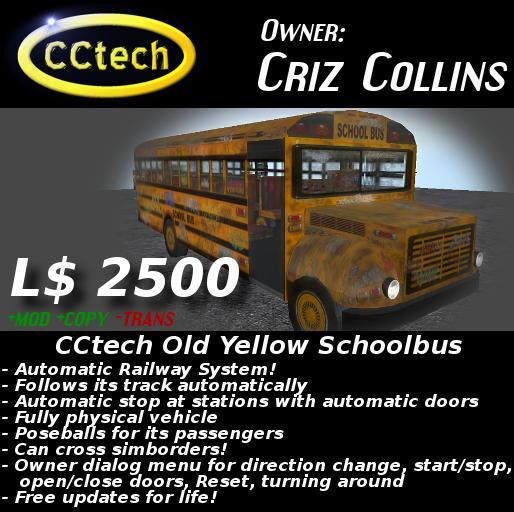

OLD STUFF ***DISCOUNT*** - This is old stuff, but still working!
~~~~~~~~~~~~~~~~~~~~~~~~~~
CCtech Old Yellow Schoolbus (v2) - Automatic Railway System - Train System
This is the very first buyable and original automatic Railway system in
Second Life! With full automatic self configuration!
What does that mean? Well, this is a system to build your very own railway on
your land or on your sim(s)! Yes, this system can also cross sim borders! You
can connect as many sims together with this system as you want.
Demo and testing area:
http://slurl.com/secondlife/Vodka/182/90/3902
Thanks to Arcadia Asylum for this fine build!
Remember: This vehicle was created by Arcadia Asylum. Only the scripts are made by CCtech. You are paying only for the scripts and the idea and work behind the scripts. The shipped vehicle itself, which holds the scripts, is a freebie and should never be resold alone.
Following features are included:
full automatic self configuration!
Free updates without charge!
very low lag programming! (script time <= 0.05 ms)
follows a closed track forever in one single direction
follows a not closed track and drives backwards at its ends
doesn't turn around at the end of the track, simply moves backwards
different rail objects to get the following possibilities:
Station rail - the vehicle stops for a defined time and opens its doors
Simborder rail - the vehicle is able to cross simborders!
Column - An example column to build a suspension railway path
Owner dialog menu for the following options:
Start/Stop between stations
Open/Close door(s)
Turn around - The vehicle turns around while driving into one direction
Change direction - The vehicle stops and follows its track in the backwards direction
Reset - Hard reset the vehicle - Used to let the vehicle ask for updates
You can find the (cheaper) NON copyable version here:
https://www.xstreetsl.com/modules.php?name=Marketplace&file=item&ItemID=1497139
You ever wanted to provide something special on your Sim?? You want to provide
a public vehicle with a locked path to your users? You ever wanted to provide
something like a train or a railway??
Well this is your chance!!!
Demo and testing area:
http://slurl.com/secondlife/Vodka/182/90/3902
Create a sightseeing tour or simply an ability to reach the points of interest
on your sim!
This railway system provides all you need! And it is sooooo quiet simple!
Simply rezz the rails, then rezz the railway wagon and it finds his path
automatically! No configuration needed!
Also look at the attached pictures!
NO CONFUGURATION NEEDED!
Check out my other versions of this great product and/or my other products!
There will be many things you may need or want if you are interested in this one!
--> https://www.xstreetsl.com/modules.php?name=Marketplace&MerchantID=145038
CCtech Railway - INSTRUCTIONS
===================
Thank you for buying our automatic railway system!
INSTRUCTIONS:
You'll find five things in the package:
- CCtech Rail
- CCtech Rail - Simborder
- CCtech Rail - Station
- CCtech Rail Column
- CCtech Railway
The first three things are the path, the rails of the railway. Rezz the "CCtech Rail"
as often as you need them. It is the general rail path. Move it at least about
4 meters above the ground!
Attention: the distance between the centers of one rail to the next rail
has to be NOT greater than 10 meters!
Every rail in the package is 10m in length. So rezz them and connect them
together without space between them. Then everything is correct.
If you want to create a railway station where it should stop and open
the doors, rezz the "CCtech Rail - Station". Don't be afraid, it just looks
the same as the "CCtech Rail" above and it IS the same, except the name
of the object. The Railway will find this station automatically and it will
stop there and open his doors for 60 Seconds.
ATTENTION on Simborder crossing:
If you need connect two or more sims with this railway... rezz the
"CCtech Rail - Simborder" on every site of the border. So one on the first sim
and one on the second sim (connected together). (This is explained in more detail
in the information notecard in the package)
You can create your own rails and station-rails: Simply create a prim and
name it like the ones in the package: All rails has to be named "CCtech Rail"
and all station-rails has to be named "CCtech Rail - Station"
After you've built the path for your railway, rezz the "CCtech Railway". This
is the wagon, which automatically follows the path you've created.
If you have any problems or questions, don't hesitate to IM Criz Collins
Veja o item no Second Life- OLD STUFF DISCOUNT - This is old stuff, but still working!
- OLD STUFF DISCOUNT - This is old stuff, but still working!
- OLD STUFF DISCOUNT - This is old stuff, but still working!
- OLD STUFF DISCOUNT - This is old stuff, but still working!
- OLD STUFF DISCOUNT - This is old stuff, but still working!


total joke and missleading. The rails come 10 meters finds out then have to 5 5 meters or shorter so the doubles maybe triples the prim usage. The bus doesnt stop at all stations all the time its very tempermental, I asked maker tried blamimg everything on lag. Total waste of money and very poor support. He calls me after I write this report and calls me names and such, if you see this product RUN!!!!!!!!!!!!!!!!!!!!!!!!!! its junk and so is the support.