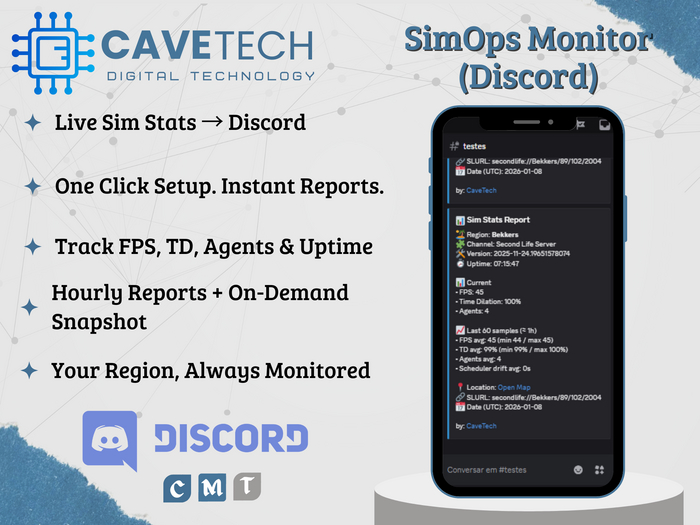

CaveTech – SimOps Monitor (Discord) is a clean, professional region performance monitor that shows live stats in-world and delivers organized reports directly to your Discord channel.
Place it in your region, set your Discord Webhook, click Enable, and you’re done.
What it does
Live hovertext above the object with key metrics:
FPS, Time Dilation, Agent count, Uptime
Plus ~1 hour rolling averages for quick trend spotting
Discord reports delivered automatically (default: every 1 hour)
Snapshot on demand (one click) when you need an immediate check
Event awareness: detects region restarts and simulator version/channel changes (optional alerts)
Why you’ll love it
✔️ Fast setup: Webhook + Enable
✔️ Clear, readable reports (no clutter)
✔️ Perfect for estates, event regions, clubs, rentals, and admins
✔️ One script, region-friendly, reliable scheduler (no “missed” reports)
Included
CaveTech – SimOps Monitor (object)
CaveTech_SimOpsMonitor_Discord (script)
Quick README (setup & usage)
Requirements
A Discord channel Webhook URL (Server Settings → Integrations → Webhooks)
Keep your region under control — with real stats, saved history, and Discord visibility.
by: CaveTech – Digital Technology for Second Life
- Live Sim Stats → Discord
- One Click Setup. Instant Reports.
- Track FPS, TD, Agents & Uptime
- Hourly Reports + On-Demand Snapshot
- Your Region, Always Monitored
