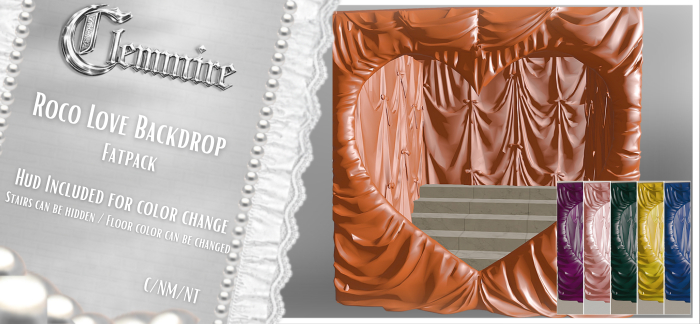

THIS LISTING IS FOR THE FATPACK
Item can be resized on touch.
A backdrop perfect for any elegant or valentine/love inspired shoot - Each color pack comes with an option to hide/show the stairs and a hud to change the floor to either a black or white marble style. Or you can get the fatpack that includes all colors alongside exclusive fp shades.
Let your imagination run wild with tons of possibilites, be it PG or maybe even a tad spicy
Rezz impact - 22 li
Backdrop is COPY/NO MOD/NO TRANSFER
Single color packs comes with:
Hide/Show hud button for the stairs & A hud to change the floor to white or black marble. (You can totally use your own floor texture by rezzing a square prim, adding the texture on that, making it fit inside the backdrop and then wala!)
Backdrop is phantom to allow for ease of entering,exiting,manouvering props,etc
Clemmire Refund Policy
▬▬▬▬▬▬▬▬▬▬▬▬▬▬▬▬▬▬
Sales are final, there are no refunds unless :
The Marketplace has charged you twice for an item.,
If you decide to purchase a Fatpack after having purchased a Single Pack.,
If this happens, then please contact me. Otherwise before purchasing an item :
When gifting, be sure you have input the correct username and double check the cart before you check out.,
▬▬▬▬▬▬▬▬▬▬▬▬▬▬▬▬▬▬▬▬▬▬▬▬▬▬▬▬▬▬▬▬▬▬▬▬▬▬▬▬
♡ REDELIVERIES
If you purchased an item through the Marketplace, on your browser go to :
My Marketplace → My account → Order History.
In that page you can browse your purchases and request a redelivery from there.
▬▬▬▬▬▬▬▬▬▬▬▬▬▬▬▬▬▬▬▬▬▬▬▬▬▬▬▬▬▬▬▬▬▬▬▬▬▬▬▬
BEFORE BUYING:
** The instructions below are a simple solution to fixing this issue without having to increase your graphics, causing you to lag. Debugging your settings will make all sculpties look the way they're supposed to no matter how far you zoom away.
Press Ctrl-Alt-D (Opt-Ctrl-D on a Mac) to show the "Advanced" menu. If a pop up occurs saying XYZ - ignore it and just click "Okay" as it doesn't mean anything, just don't mess with anything except what's mentioned below.
Once you've clicked on the Advanced menu, choose "Debug Settings",
In the search bar, type in or copy and paste the following:,
RenderVolumeLODFactor
Below that, you'll see a smaller box with numbers. Set it to 4 or higher. (I usually just type 5 and it works perfectly.)
You may have to do this every time you log in - and i can not guarantee it will completely fix any and all LOD issues including this product.