Closeout Sale This is the Beta and is no longer supported nor will this any longer be updated we have updated all previous purchases of this model and it is now only offered for those who cannot afford the full version to see the full version check the items listed bellow
After unpacking the Box you will receive a few different items, the one labeled
"Clear Creek Tiger ~ AVATAR ~{MESH} (BETA) - boxed"
Is the complete avatar - you can simply open this box - then go to the correct folder in your inventory and choose - REPLACE OUTFIT - to wear your new AVATAR. The other items will be a backup
The Emote HUD will play animations shown - When you click a button it will turn green to remind you to turn it off by clicking it again.
Which leads us to the next section using your AO!
The CCO Predator AO sits on the bottom right side of your screen and is integrated with several features to control your Tigers attributes as well, it is in essence the Tiger Command center. This AO also is equipped with speed enhancers to make your tiger faster just like they are in the real world. Touch the Tiger logo to open the HUD and gain access to the AO menu and other integrated features.
The bottom half of the AO is dedicated to the Animation override itself. Menu - brings up your AO menu and all controls - Push enables the push AO to give you speed and gait changes from walk to full run. Sits lets you choose the sit you would like to use when sitting down (not ground-sitting which has a dedicated sit) Stands will let you choose which current stand animation is playing. Walks will control which animation you are using and if push is enabled the speed will increase with each walk.
Load will load your default NC and settings.
Your Clear Creek Tiger comes equipped with some nasty hardware. The claws can be extended or retracted with the claw button on the Predator AO.
To attack you must enable the combat system this will also enable your expression system so you can growl bite and lunge at victims. Do not worry about doing damage to anyone even with the system enabled UNLESS you are wearing a combat meter your claws shouldn't do any damage to anyone.. But they are a lot of fun! - If however you decide to use the tiger in metered combat that option is available as well, just be sure to wear the appropriate meter and use the correct fighting style listed bellow.
To use the combat system - after drawing the claws with the HUD - then type draw in open chat - you will hear a growl to let you know you have enabled the combat system.
For Dyna channel meters such as GM all you need to so is click the ground in front of you in the direction of the person you wish to attack and if you are in range you will do damage- me-lee sword type damage. You can also just hold down the button and it will attack constantly until you release, Full Auto Attack!
Or you can enter mouselook and click directly on the person you are attacking.
To disable the combat system type sling in open chat
For DCS2, CCS, type meters simply say dcs in open chat and you can then use the standard - hold down left mouse button while using direction arrows to attack and do base me-lee damage on those meters.
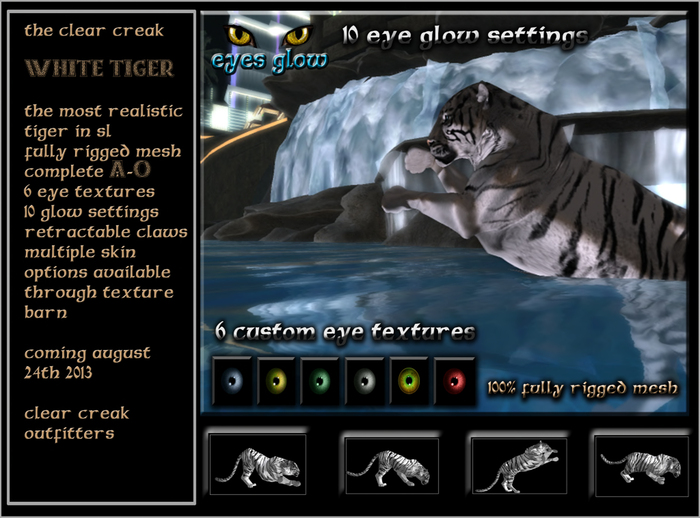
Your Clear Creak Tiger has 6 different eye textures for each eye which can be changed independently of each other. By using the selections on the Predator AO you can chose to change one eye to one color another eye to another color - or both eyes to the same color. This gives you a range of individuality not normally found on many mesh Avatars.
The Nocturne System - is a comprehensive set of EYE glow settings. If you click the blue eye in the center of the Predator HUD near the top it will take you through 10 enhanced eye glow settings, from full glow - to none at all. this ads yet another layer of individuality to your AV.
The AO is equipped with speeds built into it. Walk has a speed of 3.0 which is slightly slower than a normal walk. The speeds increase as you go all the way to full run. To work through the speeds - simple press forward to walk - then while walking quickly tap forward again, to fast walk - then again to lope - and again to run. If you find that the speed is too fast for any given setting you may change the speed in the NOTE-CARD of the AO in the walks section by playing with the numbers at the end of each walk in the NC. the lower the number the slower you go
You can also change the speeds / gaits by selecting walks from the AO HUD and choosing a different gait.
Ver el artículo en Second Life Ver vídeo »


So, this looks really nice. However...
the Emote HUD seems as if it should do something else, you have emote a and emote b which is head and ears, I think. But the ears don't seem to do anything, which, I wonder if that's a hud messup, or if I was mistaken, or whatever. It's not quite as straight forward as one may consider.
That said, I have not read the destructions yet, and I may very well edit this review if they make it more clear and concise :)
A ripoff
Im not happy with it i want my refund back
+-
Good texture, good animations, but the feet aren't nice, and the body is thin in my oppinion, also the run animations is bad, and the turning to side too. Other then that, its ok:)
not too bad
the eyes are a little funny when it blinks, and the paws are a bit funny too when it walks, other than that it's worth it.
Thumbs Up
I love this so much, defiantly worth 500l, just one thing i dont really like is you can only be a white tiger.. why cant i change ?
Buy This AV
If you want a great Tiger AV, this is the one. The more expensive Full version sucks, and is not worth the Linden. In fact this AV should be 2,000L, and the Full version should be a freebie, it's that bad. As for a sound HUD, no this AV doesn't come with one, BUT I found a sound HUD that works great with this AV, and is a freebie to boot. The "RP Series Tiger HUD" is 0L, and has great sound effects for a tiger, plus it works great with this AV. I love this AV, the textures, animations and the HUDs are great. Yes, it could use more animations for drinking, emoting, fighting, and it would be nice if this were ride-able, but all in all it's still way, way better than the Full version. I highly recommend this Tiger AV, please don't waste your money on the Full version. Buy this AV, if you want a Tiger AV that is practically perfect in every way. :)


