
━━━━━━━━━━━━━━━━━━━━━━━━━━━━━━━━━━━━━━
Main Menu
━━━━━━━━━━━━━━━━━━━━━━━━━━━━━━━━━━━━━━
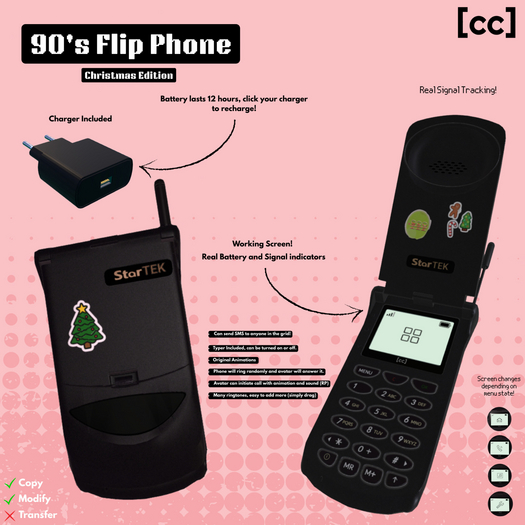
The main menu displays:
• Signal Strength (▂▄▆██ 0-100%)
• Battery Level (▌▌▌▌▌ 0-100%)
Menu Options:
[Ringtones] - Change your ringtone
[Send SMS] - Send text messages
[Call] - Make a phone call
[⚙ Settings] - Configure phone options
[C] - Close the phone
━━━━━━━━━━━━━━━━━━━━━━━━━━━━━━━━━━━━━━
SMS Text Messaging
━━━━━━━━━━━━━━━━━━━━━━━━━━━━━━━━━━━━━━
Send instant messages to any avatar in Second Life!
HOW TO SEND AN SMS:
1. Open phone and select "Send SMS"
2. Enter recipient's username OR UUID
3. Type your message
4. Message is delivered instantly!
REQUIREMENTS:
• Minimum signal strength required
• Battery must be above 0%
QUICK RESEND:
• If you've messaged someone before, the phone
will ask if you want to message them again!
━━━━━━━━━━━━━━━━━━━━━━━━━━━━━━━━━━━━━━
Phone Calls
━━━━━━━━━━━━━━━━━━━━━━━━━━━━━━━━━━━━━━
MAKING A CALL:
• Select "Call" from main menu
• Your avatar will perform a calling animation
• Call lasts approximately 20 seconds
AUTO INCOMING CALLS:
• Phone will randomly ring when closed
• Opens automatically to answer
• Plays your selected ringtone
REQUIREMENTS:
• Signal strength above 0%
• Battery must be above 0%
━━━━━━━━━━━━━━━━━━━━━━━━━━━━━━━━━━━━━━
RINGTONES
━━━━━━━━━━━━━━━━━━━━━━━━━━━━━━━━━━━━━━
Customize your phone with different ringtones!
HOW TO CHANGE RINGTONE:
1. Open phone → Select "Ringtones"
2. Browse pages using "Next" / "Previous"
3. Select a number (1-9) to choose a tone
4. Press "Play" to preview
5. Press "Set Ringtone" to apply
ADDING CUSTOM RINGTONES:
• Drop any .wav or .ogg sound file into
the phone's inventory
• New sounds appear automatically in menu!
━━━━━━━━━━━━━━━━━━━━━━━━━━━━━━━━━━━━━━
BATTERY SYSTEM
━━━━━━━━━━━━━━━━━━━━━━━━━━━━━━━━━━━━━━
Your phone has a realistic battery that drains over time.
BATTERY INDICATORS:
▌▌▌▌▌ 91-100% (Full)
▌▌▌▌▁ 71-90%
▌▌▌▁▁ 51-70%
▌▌▁▁▁ 31-50%
▌▁▁▁▁ 11-30% (Low)
▁▁▁▁▁ 0-10% (Critical)
LOW BATTERY WARNING:
• Warning at 20% - charge soon!
• At 0% - SMS and calls disabled
CHARGING:
• Use compatible StarTek charger
• Hover text shows charging progress
• Plays sound when fully charged
━━━━━━━━━━━━━━━━━━━━━━━━━━━━━━━━━━━━━━
