
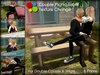


:::OBF::: Couple Picnic Table - Type B2 (Texture Change) - ver.2.0.
- Features:
- 4-seater (2 Couples / 4 Singles).
- 7 Types of Single Pose / Animation, PLUS Original Eat / Eat Soup Animation for Male and Female.
- 12 Sets of Couple Pose / Animation (Double Couple on Seat Right / Left).
- Swap Feature for Couple: No need to reseat if you sit in the wrong position.
- 21 Types of Texure.
- Prims: 6
- Permissions: NO trans / mod / copy
-------------------------------------------
CHANGE POSE
/ ADJUST SITTING POSITION
-------------------------------------------
Click a picnic table to open menu.
- 4-seater (2 for the right and left seat each).
- [Single Sits]: 7 single poses.
- [Eating]: Original eat / eat soup animation for Male and Female.
- [Couple M / F]: 12 sets of couple pose.*
- [SWAP]: Swap a seat without reseating.**
- [ADJUST]: Up to the last 400 user's personal adjustments (position / rotation) will be stored until the memory is full.***
* To use couple set , have the same seat (right or left) where your parter occupies. Couple pose / animation will synchronize.
** Swap feature will work on the same side, right / left.
*** at which point the oldest 10 are removed to make room for new ones. (the owner's adjustments take memory storage priority).
-----------------------------
CHANGE TEXTURE
-----------------------------
Click a shadow of a picnic table to open menu.
21 textures available.
--------------------------
CHANGE COLOR
--------------------------
Attach ":::OBF::: Color Picker HUD" (default on Top-left) and click color palette.
You can freely pick up color, like on Second Life edit tool.
--------------------------------------------
RESTRICTED OWNER MENU
--------------------------------------------
LEFT-CLICKHOLD on a picnic table to open menu. (OWNER ONLY).
- [Access]: Toggle sitter access mode (Owner / Group**** / Public).
- [Expressions]: Toggle facial expressions (On / Off).
- [Reload MPS]: Reset pose system scripts.
**** While in group mode, the group allowed is determined by the one set for the object.
To set an object to the group:
1. Right-click the object and select "Edit".
2. Under the "General tab", click the Edit [Wrench] button.
3. Select a group. The object is set to this group.
And a sitter needs to activate the appropriate group to sit.
To activate the group tag:
1. Select "Communicate" > "My Groups" from the menu at the top of the Viewer.
2. Right-click on the name of the group you wish to make active.
3. Click "Activate".
4. The group name changes to bold to indicate that it is active.
- 4-seater (2 Couples / 4 Singles).
- 7 Types of Single Pose / Animation, PLUS Original Eat / Eat Soup Animation.
- 12 Sets of Couple Pose / Animation (Double Couple on Seat Right / Left).
- Swap Feature for Couple: No need to reseat if you sit in the wrong position.
- 21 Types of Texure.


