![[Curlex] Messenger Owl - Deliver Letters!](https://slm-assets.secondlife.com/assets/20357524/lightbox/SellSign_MessengerOwl.jpg?1524076330)
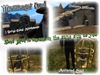
If you're like me and you love the world of witchcraft and wizardry, then this is just something you have to own!
This cute owl that rests on your arm allows you to send notecards to anyone located in the same sim as you! Simply edit the notecard found inside the owl on your arm, save it, then mail it.
--------------------------------------------------------
[I] ATTACHMENTS [I]
►Messenger Owl ◄
This is the main owl attachment that goes on the Right Forearm. It will be transparent upon attaching until you take the owl out of it's cage. See next attachment for more details.
► Bird Cage (Messenger Owl)◄
This is the secondary attachment that goes on the Left Hand. You have to wear both attachments in order to fully interact and use the owl.
--------------------------------------------------------
[II] INTERACTING [II]
● Caged Owl ●
The Owl is, by default, inside of it's cage. In order to take it out and use it you must wear both attachments and left click on the cage that can be found in your left hand. This will take the owl out of its cage and detach the cage automatically. If you reattach the cage you will put the owl back into its cage.
● Mailing a Notecard ●
The Owl can send mail to anyone inside of the same sim as you through a simple command. The notecard inside of the owl can be edited or replaced with another notecard to send custom written mail. To change the mail simply right click and edit your owl on your right forearm and write something different in the notecard then save it and use the command listed below.
mail USERNAME
/1 mail USERNAME
Example 1: mail Curl
Example 2: /1 mail Curl
Please note: Mailing letters DOES require rez rights.
● Petting ●
You can pet your owl simply by touching it while it's on your forearm. Touch it a second time to stop petting. You will praise your owl and pet it when it returns from delivering mail also.
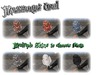
● Owl Skin ●
You can change your owl skin by using commands listed below:
/1 owlskin#
Example: /1 owlskin3
Please note: There are 7 owl skins currently. However, not all may be accessible.
---------------------------------------------------------
