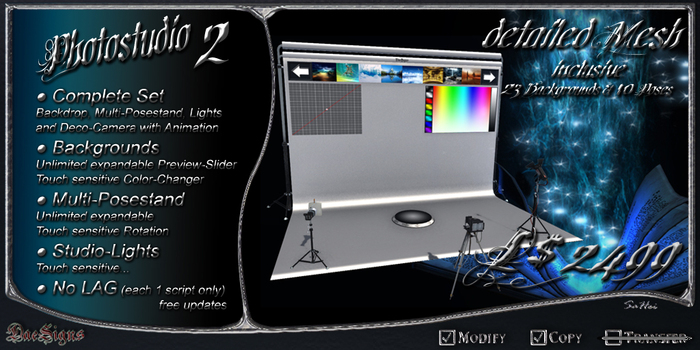
*DS* Photostudio 2
The Photostudio consists of 5 components that use only 1 script:
1.) *DS* Studio Backdrop: 1 Script,
2.) *DS* Studio Model-Stand: 1 Script,
3.) *DS* Studio Light (1): 1 Script,
4.) *DS* Studio Light (2): 1 Script,
5.) *DS* Photo Camera: 1 Script.
The PrimCount or Land-Impact is calculated dynamically and depends on the size, since it largely consists of Mesh.
With the current size consumes the entire studio, with all 17 prims with a Land-Impact of 49 prims.
The operation is very extensive, so I try to keep as short as possible.
1.) *DS* Studio Backdrop:
The studio can move the offset of the background completely.
This simply press the left mouse on the screen and moves the mouse over the image.
The central focus of the texture is then always under the mouse.
Considering the mouse on a page pushed out of the studio, set the texture back into the middle.
Menue: (just click to open the roll with the DaeSigns Logo)
[Backdrops]
Opens and closes the preview, click on the arrows to scroll left & right.
If you click on an image in the preview, the studio takes over the texture on the canvas.
The pictures can be extended and there is no limit
To expand the image, just open the studio with the build menu and change to the Contents tab,
there is then simply places the images into the object.
Important:
All images in the studio must be Fullperm.
[Color]
Opens and closes the color palette, where you can specify the color of the canvas.
The studio takes over the colors immediately.
[Scale]
Opens and closes the grid, where the texture that is currently on screen in all directions can distort.
The studio takes over the values immediately.
[Show All]
Opens Backdrops, Color & Scale at once.
[Hide All]
Closes Backdrops, Color & Scale at once.
[Restore]
Sets the complete texture alignment (offset & repeat) back to default.
[Fullbright]
This is nothing other than the primary option "Full Bright".
[Blank]
Of course, the blank texture is also present.
[Update] *
To use this function, it is imperative to rez the studio in *DaeSigns* Mainstore.
[ON/OFF] *
Just On & Off
At the turn is the message: *DS* Studio Backdrop: 23 Textues available, Free Memory: 36732 bytes.
[Reset] *
Reset the Script.
[Close]
Closes the Dialog menu.
(* Owner only)
INFO:
It's possible the studio backdrop to enlarge or shrink as a whole.
pressured to editing, just hold the Ctrl and Shift key and put on the white corner markers.
When smaller reduces the amount of primary and enlarge the increased amount.
2.) *DS* Studio Model-Stand:
The Posestand can be filled as the backdrop unlimited.
Open the Posestand easily with the Build menu and put as many poses as you want into it.
Use the arrows on the side of the stand, you can change the poses.
Why are the arrows are located all around?
Quite simply, you hold down the mouse button pressed on the top of the stand and move the mouse slowly,
the Posestand rotates with the avatar in the desired direction.
Der Posestand kann aber noch mehr:
Mit einem Doppelklick auf den Posestand, oeffnet sich das Options-Menue.
[Show] & [Hide]
Just show & hide of the Posestand.
[Lock] & [Unlock]
Locks and unlocks the rotation function.
[<< Prev] & [Next >>]
Also changes the poses.
[Up] & [Down]
Moves up and down the Avatar.
[Reset] *
Reset the Script.
[Close]
Closes the Dialog menu.
(* Owner only)
3.) *DS* Studio Light (1):
4.) *DS* Studio Light (2):
Deco and light source:
Both light sources have the same options.
To open the menu, just click the lamp.
[ON/OFF] *
Just On & Off
[ColorPad]
Opens the color palette, which lets you set the color of light.
The pad is the same as on the studio, with only one difference.
On the left side no full-color being selected, but the range of light.
[Reset] *
Reset the Script.
[Close]
Closes the Dialog menu.
(* Owner only)
5.) *DS* Photo Camera:
Deco: Has only one animation and a sit-script.
Voir l'article dans Second Life- rezzed DEMO already in the Mainstore
