
~Dream Snatcher's Presents~
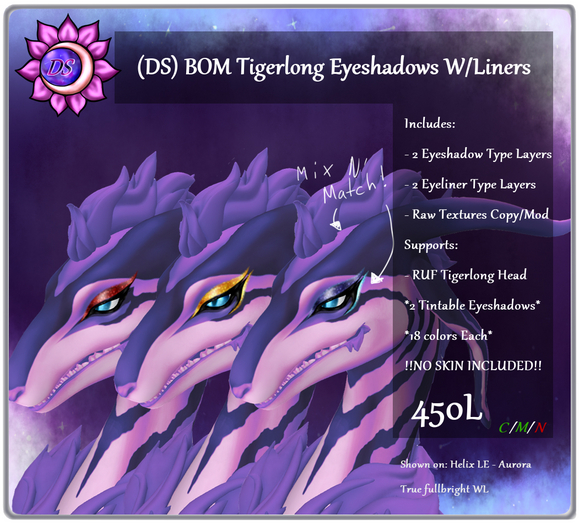
(DS) BOM Tigerlong Eyeshadow W/Liners
Included you will find:
- 2 Sets of Eyeshadow Layers in 18 colors each
- 2 Eyeliner Layers
- Raw Textures with Copy/Mod/NoTrans permissions for layer making
*2 of the eyeshadows are fully tintable!
Notes for Setup:
You must be using a BOM Mod kit for your Base Skin (can be skin or tattoo layers as the base)
Tintable Layers are able to be tinted by adding the layer and then clicking edit and using the color square on the bottom right to change the color and click save for all the other colors not offered!
Mix N Match!!
To Mix N Match first choose the color you want the outter marking to be (below the eye) right click add the color of your choosing of V1 Eyeshadow. Then Right click add the color of what you want the top of the eye to be out of the V2 Eyeshadow. After that Add the V1 Liner for best results like in the Ad image!
Setup:
1) Put on your Tigerlong skin and all fully assembled
2) Right click > Add > Eyeshadow of your choice
3) Right click > Add > Eyeliner (Optional)
4) Leave a review! They really help!!
5) Go strut your stuff and enjoy being different from the crowd!
Parts List:
-RUF Tigerlong Head
Location of parts: http://maps.secondlife.com/secondlife/Refraction/243/42/507
If you need any help or have any questions please do not hesitate to contact me!
FAQ:
Q The eyeshadow isnt working/showing up on my face. what did I do wrong?
A Make sure you put the eyeshadow on second to last on top of everything else (skin included cause its on a universal layer) and the eyeliner LAST if the layer order doesnt work right it wont show so if you have to toggle them up or down accordingly with the tiny arrows next to the layer under Appearance!
Ver el artículo en Second Life- V1 Box
- V2 Box
- Instruction Notecard

