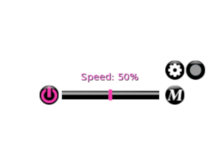

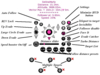
There are four combat HUDs in the Diabolic Corruption line. You are looking at the A&D version. You're probably thinking, "What is the difference between the advanced and A&D version?" The advanced version is both HUDs in one. You will get all the features of both the HUDs in the Advanced version. With more features, you get more complexity as well.
The A&D version is a simplified version of the Diabolic Corruption Advanced HUD. Fighting in A&D is the main focus of the A&D version of the HUD. You will get the features you need without the things you don't.
*****FEATURES NOT IN THIS HUD*****
There is no adjustable speed, movelock, small circle evader, or M(maximum speed button). There is also no bumpy follow and no set max speed option.
--------------------------Main Features--------------------------
*****Display*****
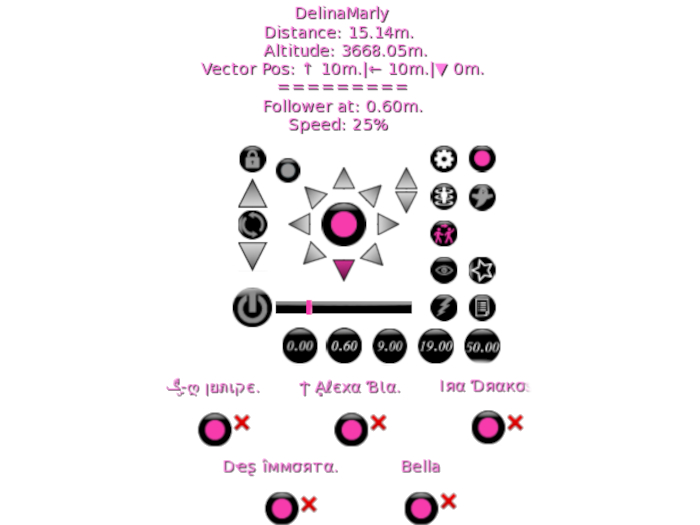
1. Target's legacy or display name.
2. Distance from you.
3. Vector distance. The vector distances show their orientation relative to you. For example, they can be two meters in front of you, 1 meter to the left, and 10 meters up. The first part of the vector distance is front or back, the second part is left or right, and the third is above or below you.
4. Altitude of your target.
5. The settings of your follower.
6. The settings of your speed.
7. The text in the display will be pink if the target is within 20m. Otherwise, it will be red.
*****Follower*****
1. Full Sim follow.
2. The follower doesn't detach when someone crosses the sim. You have free movement when the target is lost. If the target returns, your follower will latch onto them, often before they even rez.
3. The pop-up menu will show a list of avatars with their legacy or display names. The list of names is sorted by distance.
4. The follower can follow multiple directions. You can follow from the front, back, left, right, below, above, and diagonal.
5. Auto follow option.
6. Evade catcher.
*****Distance*****
1. There is a follower distance slider. You can slide the slider bar or click on the slider bar to follow from 0.00m to 2.50m.
2. There is a turbo distance button. It will multiply the distance by 20. The turbo distance button allows you to follow from 0.00m to 50.00m.
3. There is follower presets. The presets are 0.00m, 0.60m, 9.00m, 19.00m, and 50.00m.
*****Speed*****
1. A speed on/off button. Your speed will be 100%.
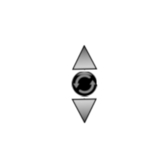
2. There is an up and down evader. It is as fast as it can be. It will detach you if you're following someone. It now can by pass other evade catchers wannabe copycats.
3. There is a full sim circle evader. If you're evading in a circle and click on the up evader, you will move in an upward helix. If you click the down evader, you will move in a downward helix. If you are not evading in a circle and push the up or down evade, you will evade at maximum force in that direction. Thus, there are multiple evaders in one.
****Other Features*****
1. There is a teleport to the target button. It will teleport you to the target if there is no landing zone.
2. There is a pause follower button. If you have a target selected and pause the follower, you can move around freely while showing their info in the display.
3. There is a face It button. If a target is selected and you click it. It will face the target.
4. There is a minimize HUD button.
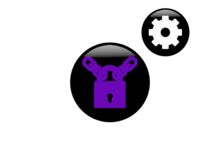
5. There is an RLV lock. The RLV lock will lock the HUD onto your screen. If you change your outfits, the HUD won't detach from your screen. You don't have to save the HUD with your clothes.
6. There are two target select buttons. You can select up to three targets and alternate between them. There are two target buttons below the HUD. When you click a target button, you can select another target. You will have someone as your primary target(the one you're currently following) and a secondary target(one below the HUD). Once you click the secondary target, the primary and secondary target will switch. You will now be following the secondary target, which is now your primary target. You can quickly switch between two targets.
To clear a target, hold the button down for two seconds.
7. There is an invisibility button. If you click on it, it will make you invisible. If you click on it again, If you click on the button again, you will teleport to another location. Teleporting to another location will remove invisibility. You will then teleport back to your original spot.
8. There is a personal target list. You can add people to the list. Once you click on their name from the list it will follow them.
9. Settings button: Move evader, Show display or legacy names when picking a target, Resize HUD, and reset scripts.


a very great and reliable Combat hud for just about any system you play!
This hud is made with quality and care and ALOT of thought into it for players BY a player. THIS hud will deliver the results you need for combat and even DEFENSE purposes. Wether you are looking to be on the offense or defense side of the fence in just about ANY system these huds will prove the experience and tools you need to not only become efficient in combat but also remain efficient in defending yourself against oncoming attackers. ITS VERY EASY to use and learn for beginners and especially fun to us. I recommend this perfect priced hud to anyone who wish to have a high quality and safe and east combat hud, I give this product not 5 but 10 stars ! * * * * * * * * * *