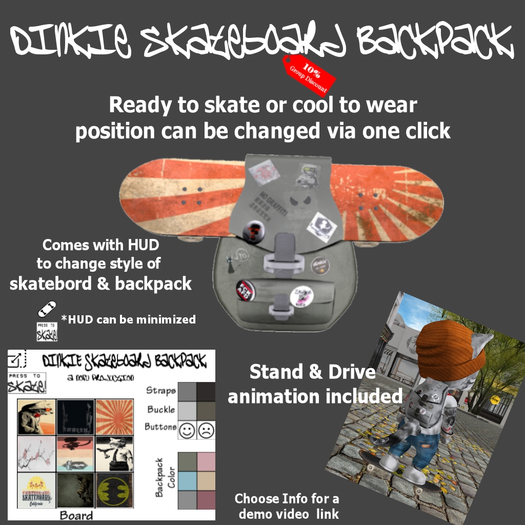

Dinkie Skateboard Backpack
What do you get here:
A Dinkie fitted backpack with a skateboard in it
A cool look ;-)
A HUD to change the style of your backpack & board
A one click option to skate SL
How to use:
Please always attach & remove the complete folder.
It will attach the backpack, the skateboard to drive and the HUD.
HUD can be used to change the design of the skateboard and the backpack.
There is also an option to remove the buttons/stickers if you don't like them.
"Press to Skate" will move the skateboard from the backpack to your paws and you are ready to skate.
There are 2 animations while riding your board: 1 stand & 1 drive animation.
"Press to Walk" will move the board back to the backpack.
This button is also available using the minimized HUD which gives you the option to switch between skate & walk
without opening the HUD to full size.
FAQ (Q-Question / A-Answer / T-Tip)
Q: I don't want to skate but I want to use the backpack.
A: Just attach the backpack and, if needed, the HUD to change design.
T: If board is not shown in the backpack toggle "Press to Skate" - "Press to Walk" via the HUD.
Q: I want to skate but there is no board showing up at my paws.
A: Make sure to attach the complete folder. Most probably you don't wear the skateboard.
T: Toggle "Press to Skate" - "Press to Walk" if it is attached but still doesn't show.
Q: I can't see the backpack but not the board in it.
A: Something is messed up (most probably you didn't attach / deattach the complete folder).
T: Toggle "Press to Skate" - "Press to Walk"
Q: The skate animation sinks in the ground.
A: Change your hover height.
T: The script will automatically change the height for you if RLV(a) is enabled in your viewer.
See: https://wiki.firestormviewer.org/preferences_firestorm_tab#extras_tab
Q: The skate animations (stand and/or drive) are not working.
A: There is an active AO which overrides the board animations.
Use an AO with animations less than Prio4 (an AO should never use Prio4 animations - blame the creator)
or disable the AO while using the skateboard.
T: If the Firestorm AO feature is used (https://wiki.firestormviewer.org/animation_overrider), the script will automatically toggle the AO.
Make sure that LockMeister protocol is enabled: https://wiki.firestormviewer.org/preferences_firestorm_tab#avatar_tab
to use this feature.
and now: Sk8 or Die!
This product is cheaper Inworld & 10% discount for "Petite Village" Group Members will be granted.
Cheers,
Nofu
https://worldofdinkies.blogspot.com/
https://petitevillage.blogspot.com/
This is designed for Dinkie Avatars. Avatar not included!
You can find the Dinkie Avatar (by Etheria Parrot) here:
https://marketplace.secondlife.com/stores/8884


