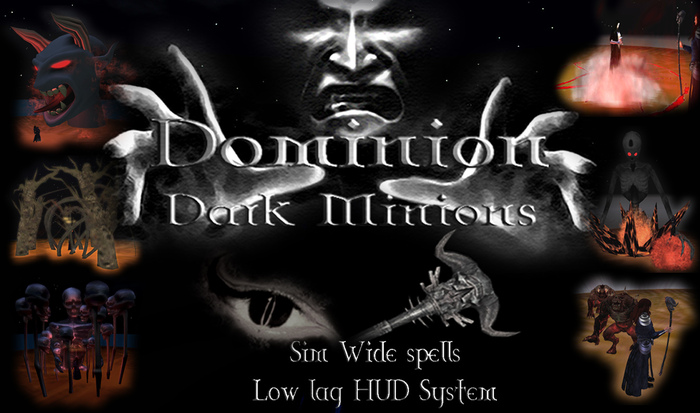

The Dominion gives its owner the dark powers of the underworld. Powers sort after by any Dark Sorcerer, Sorceress, Wizard or Dark being.
The Magic System is HUD based and can be used with or without the Staff. The HUD is small, easy to use and has just 7 scripts (including an auto update script) and uses less than 112KB memory.
The Staff is Mod/Copy/No tran. and contains one script that is full perm. which allows you to add script to it and modify the Staff as you see fit. The script used in the Staff is used to shoot fire and to hold the Staff upright, you can remove this script but if you do it will no longer shoot the fire or hold the Staff upright.
The Dominion Origin Scroll - This is gives you a background to the Dominion and must be rezzed and then touched to open/close the scroll.
HUD Functions:
Dominion Logo (HUD):
This give a menu with the following spells.
SNAKE - Call on the power of a large cobra snake which appears from a skull to spit venom at your victim to incapacitate them, holding them in a pentagram of dark magic. If your victim struggles they find them selves thrown in the air.
SORCERESS - Call on the powers of a Dark Sorceress to cast a Skull curse to entrap your foe. Calling on a skull that rises from her hands, it releases its darkness.
WRAITHS - Summon Wraiths and use them to frighten your foe, push and pull at them releasing the darkness of the Wraiths on your enemy.
HELLDEMON - Summon from the depths of Hell a Demon that will rise from the flames of Hell and place his large hand on the victim, releasing the flames of Hell on them. This spell is auto delete after about 40 seconds.
HUNGER - Call on a giant Demon from the underworld to smash thru the ground, flames surround him, he licks the victim and laughs at them then in one foul swoop eats them up.
MINIONS - You call on your Dark Minions from the underworld to surface and surround your victim. As they rise from the ground and surround them they whisper and body bump the foe, then seem to go back to the Hell they came from. But like a bad penny they turn up again.
CREEPYCRAWL - Moths, flies, spiders and a few other creepy creatures crawl on and around your foe. But these are not the small creatures of your world, they are from Hell and they keep coming.
DEMONTREE - Summon dark creature of the forrest, call on your minions to trap your victim, but not before they put the fear of Hell into them. Then once they think they survived their ordeal they realise its just started.
BEASTS - You call on your minion Beasts to appear and tear your victim from limb to limb. Don't stand to close unless you want blood stains on your shoes.
BONES - Call on a Bone Demon from the underworld to rise up and take your victim as their own, maybe they will become part of his family?
STOP - This STOPS the spells ad removes them from the sim.
Eye (HUD) Symbol - This give you the power of "Sight". Allowing you to see an avatar, watching them while you are unseen. Just choose a name from the menu. Note, your viewer can only see as far as your DRAW DISTANCE is set at. If you have a low DRAW DISTANCE some avatars far away may not bee seen. Please check your veiewer settings. This function does work even in NO SCRIPT/NO BUILD.
Staff (HUD) Symbol - This gives a menus as follows:
RED LIGHT - This lights up your way with an evil red aura surrounding you, following you.
GREEN LIGHT - This lights up your way with an evil green aura surrounding you, following you.
MAGIC AURA - Calls on an aura which can be changed to a number of colours. Just choose a colour from the list you will be given in chat, type it in chat (low case only), then touch yout avatars feet and the colour will change.
THE EYE - Summon an eye with wings flapping and choose an avatar for the Eye to follow your chosen avatar from the menu list. Any open chat near the avatar will be heard by you, even if you are in another sim.
SKULL SHIELD - Summon a shield of skulls to stop any physical bullet from hitting you. This will protect you from some physical objects, but not all. This is ment for effect rather then protection.
STOP - This will stop the Staff spells ONLY.
The HUD will also report any attacks and will tell you the name of the object/script and its owner. But there are some attacks from some combat HUDs that can hide its owner, so this is not 100%. However, this does still work in NO SCRIPT/NO BUILD. The HUD will also AUTO-UPDATE AND CHECK you have the current version and will send you any further updates.
- Low lag HUD - just 7 scripts
- Sim wide spells (unlike some work one side to the other)
- Many MESH spells with great graphics
- With Staff (but HUD based system)
- Fast scripts


