

https://s3.amazonaws.com/products.shop.secondlife.com/agni/modules/Marketplace/Images/6/0/2/6027495086f193f9a77032a834b1ad8b.png
I had a really small lot of land, I wanted to build a little shop. Originally working on an "Airship Pirates" theme, I fashioned a simple but sturdy little hangar, using as few prims as possible. Over the months that followed, I tuned up the design, and then I realized what I wanted to build there was a Movie Theater.. and so the same hangar was adjusted to serve that function as well. Soon I had added the standard sorts of features that people look for in a prefab structure, and it wasn't long before people began asking if the building itself was for sale.
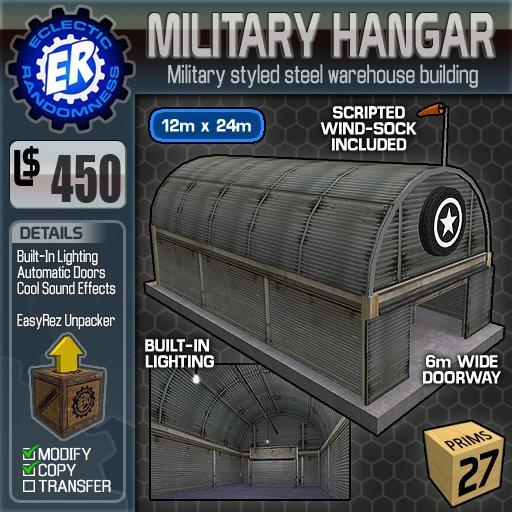
The ER Military Hangar is a prefab building with a lot of personality, and lots of possibilities. At just 27 prims, and with it's 12m x 24m footprint, it's both roomy enough for most any kind of use, and light enough that you don't need to own much land to use it! The ER Military Hangar is a sturdy steel building with a concrete floor and foundation. Packed in a simple to use "EasyRez" unpacking crate, the ER Military Hangar features built in lighting with easy to operate light switches, and a pair of steel sliding doors with exactly the kinds of security features that you'd expect from even the most expensive prefabs. And all made with the loving care and attention to detail that you've come to expect from Eclectic Randomness.
http://slx.eclectic-randomness.com/bar-divider.png
* ER Military Hangar
• Rez the "ER Miltary Hangar " crate.
• Move the crate into position.
• Click the box and select "Rez Build"
• To reposition the building, simply move or rotate the crate. The building will follow.
• When you're happy with the positioning, click the box and select "Freeze".
Once you've got it rezzed, the building itself should be fairly straightforward. Below is a list of features, and a little bit of information about each one.
* Integrated Lights
The lights are fairly simple to operate. They are controlled by lightswitches which can be found on the walls. There is no security mechanism associated with these switches. Simply click to turn on, click again to turn off.
* Automatic Doors
The doors are quite simple to operate, and include the standard types of access controls. The Owner's menu can be accessed simply by clicking the door frame (the bar above the doors). If not needed, the doors can be easily deleted, as they are a separate part from the rest of the structure.
Separate instructions are included for configuring the doors.
* Logo Panels
On each end of the building, these two prims start off as simple stars. To apply your own logo, simply apply your desired texture to the prims.
* Wind Sock (on the roof)
Another optional item.. it'll run on it's own without any help from you. =)
* The Floating Partition
The ER Military Hangar was originally created as a WWII-styled aircraft hangar, converted for use as a movie theater. The "floating partition" is a completely optional component, and can safely be deleted if you have no use for it. It was included primarily to facilitate the use of the building as a movie theater.http://slx.eclectic-randomness.com/bar-header.png
Two in-world locations to serve you:
* http://slx.eclectic-randomness.com/icon-thumbtack.png Eclectic Randomness Main Store (Adult)
* http://slx.eclectic-randomness.com/icon-thumbtack.png Eclectic Randomness Annex (Mature)Check out our website for the latest releases, blogs, and more:
* http://slx.eclectic-randomness.com/icon-er.png http://www.eclectic-randomness.comhttp://slx.eclectic-randomness.com/bar-divider.png
©2009 Eclectic Randomness™
Eclectic Randomness™ and the Eclectic Randomness™ "gear" and "gauge" logos are protected
trademarks, and may not be used without express written consent of Winter Ventura
http://slx.eclectic-randomness.com/bar-divider.png
Keywords:
Winter Ventura Prefab Hangar Warehouse Shop Store Garage Building Military Base Airfield Airport Aircraft Airplane Plane Home House First Land

