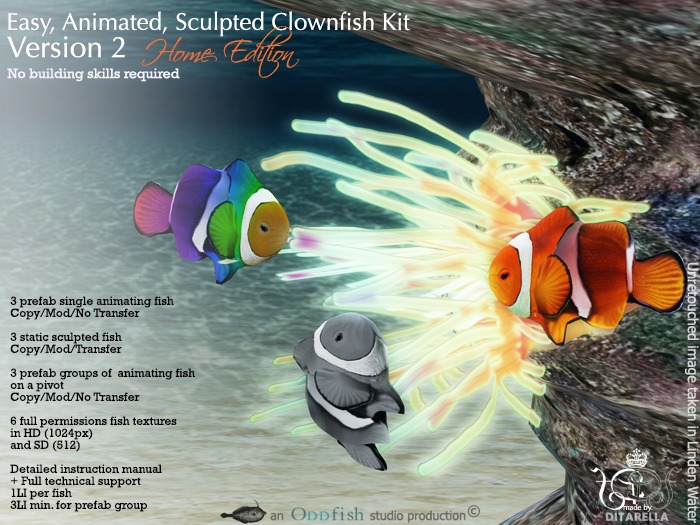
Easy, Animated, Sculpted Clownfish Kit (Home Edition)
The main contents of this kit is as follows :
3x Animated and swimming Grouped Fish (2,3,5)
4x Static Clown Fish (Mono, Disco, Neemo, Blank)
6x Baby Clown Fish (Animated + Animated and 'Swimming')
6x Single Clown Fish (Animated + Animated and 'Swimming')
6x Full Perm Textures (in 512 and 1024)
2x Fish Pivot (For 512 and 1024)
1x Notecard Instructions
What's new in Version 2.0
Same great kit with better textures in both standard definition (512) and high definition (1024)
Which you decide to use is up to you and will be dependant on your own projects but the choice is now yours!
Animating aid now integrated with pivot.
Introduction.
This is a new version of the Easy Animated Sculpted Clownfish Kit which requires no building skills as all the fish have already been built for you.
All you need to do is rez it any where you wish.
The biggest difference between the professional kit and the home edition kit is that the professional edition kit allows you to transfer the fish you build yourself.
This kit allows you to copy,modify and make as many fish as you like but they cannot be transferred.
Touch your fish to make it start wriggling its tail side to side.
Touch the fish pivot (rainbow coloured cube prim) to make your fish start and stop rotating. The cube will turn transparent when you touch it to turn on the rotation.
The rest of this notecard gives you a little bit more information if you want to modify your fish.
Thats it!
To re-texture your fish
Rez your fish in world. It doesn't matter which type in this kit. ALL your fish are modifiable. Only the scripts inside them are not.
Carefully drag the texture you want to re-texture your fish with , onto the fish.
This should instantly set the chosen texture on the fish of your choice.
Making Your Clown Fish Swim
This is a very basic way of making your fish look like it swims by rotating it around a pivot.
Rez the pivots provided from your inventory in world. (512 is good for regular use. Use 1024 only if your fish are huge and need bigger textures for better definition)
Link fish to pivot and adjust fish position in edit. (Edit linked)
Touch pivot to start rotation. Touching pivot again stops the rotation.
Thank you for choosing to purchase our products
If you have any problems with your purchase please do not hesitate to get in touch.
Enjoy!
Dita Actor
License :
This work is a collaboration between Dita Actor and Fiorella Fierenza and is released to you on purchase, with a creative commons license
http://creativecommons.org/licenses/by/3.0/
You can
incorporate this kit in your own creations for sale
You cannot
re-sell this kit as your own original work in a form similar to its purchase
redistribute any component of this kit with full permissions
give any component of this kit away as a freebie
New Shop :
Posertry + Oddfish Studio
Blog : http://oddfished.blogspot.co.uk/
Flickr : http://www.flickr.com/groups/2563588@N23/
See Dita's personal photo stream on : http://www.flickr.com/photos/ditadata/
You can also see examples of fish in Store Location (from Feb. 2014) : http://maps.secondlife.com/secondlife/Jersey%20Island/171/207/21
- Different version of great kit requiring no building skills
- Amazing low lag clownfish at a great price
- Make as many copy clown fish as you like
- Modify to suit your own purposes
- Full Technical Support


