
Hello and thanks for being a customer, as I appreciate the support for what I do, and love knowing that my creations are being used.
There are a few things you will need to know to get the most from your purchase.
All pieces I make are copyable and modifiable. Please make a backup of any piece before you modify it. If you forget, right-click on the item in your inventory and copy/paste it before you detach. That way, you may be able to redeem an unchanged version if you have an oopsy.
Yes they are original mesh, made from scratch, as is everything I sell. (I was making an outfit, and just needed a crook, so here it is.)
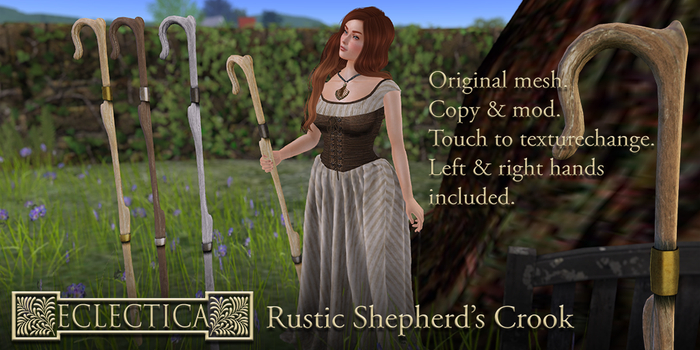
This pack includes 2 crooks. One for the right hand and one for the left.
If you wish to edit size, hue, etc (any of the prim parameters), you may do so by using the edit menu.
They will resize down to a toothpicky 0.09212m long. More than small enough for a tiny.
Tinting mesh is a little different to tinting prims, as each object behaves as one prim. So instead of editing linked prims, you will need to use the "Select Face" button to choose the part you'd like to tint. The separate faces are:
....the wood
....the metal.
There is a small transparent face set off to one side, to assist in scaling down for very small avatars. If this ever becomes visible after you've played with texturing, just select it and make it transparent again.
You may touch the crook while wearing it to access a dialog menu. This will guide you through scripted resizing (if you prefer to use that method) and texturechanging. There are options for dark, pale and ashen wood, and dark, silver and brass metal bands. This script may be deleted if you like to keep your script count down (it's a single 64 kb script but they do all add up). Please keep a master version in your inventory.
The two crooks each have a hold animation and script inside the main mesh part. This is to allow your avatar to hold the staff while standing and walking. It is designed to lock just the joints needed to do this, and to allow all the rest to go with the flow. There is an ease-in and an ease-out to make this transition "flow" and not jerk you about, because who likes that. The animations affect the shoulder, elbow and wrist on the relevant side and should allow other animations to play. The priorities on the staff animations are 4 (the highest).
Look for a popup that requests your permission on rez/attach. If you cannot see it, SL may have sent it to notifications> system. Just say yes. I am not malicious. Mwahahahah :)
If you find that the staff animation does not appear to work, I suggest finding a stand and walk that is set to lower than a 4 priority. Or you can duckwalk, and I do appreciate that this option is not always the best.
I have tested the crooks with a variety of animation overriders, from a variety of creators, and have found that some walk and stand animations are already set to a 4 priority, not allowing other animations to override them. Testing with friends has similar results. I recommend that when you try the crooks, test them with a variety of walks and stands. You will find one that suits.
These are unrigged, meaning that you can adjust their positioning using the edit menu, reattach them to other parts of your body if desired, link other items to them, or simply use them as props by rezzing them on the ground. The contents are removable, but please only do this to a copy.
A demo pack is available instore.
If you wish to see more, just visit the Eclectica shop in Sinaburoe, or IM Tiffy Vella inworld with any queries.
See item in Second Life- Original mesh. Copy & mod.
- Copy & mod.
- Left and right hands included.
- Touch-to-texturechange.


