✧˚₊‧⁺‿︵ •ᴇᴠᴇʀɢᴀʀᴅᴇɴ• ‿︵⁺‧₊˚✧⠀
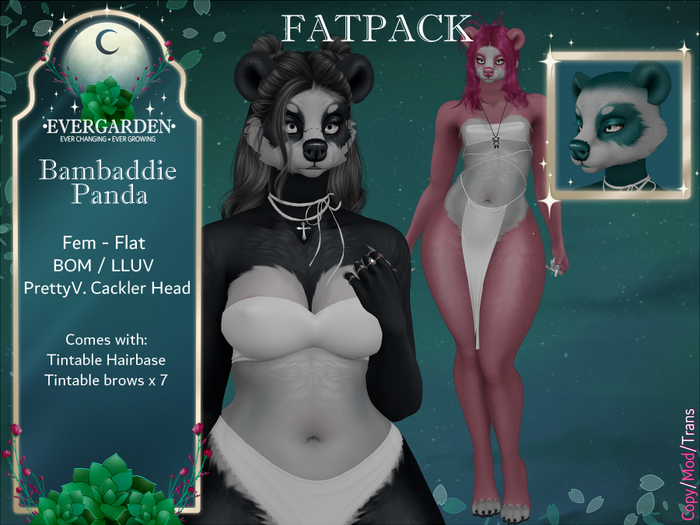
Pretty V. Cackler - LLUV
BOM Mod
Tag the store on bsky @evergardensl.bsky.social
or show me in the •ᴇᴠᴇʀɢᴀʀᴅᴇɴ• discord https://discord.gg/sWKJuCPVfA
•••Here is what you'll need!•••
• Head - Cackler head by Pretty V.- Currently at Abnormality Feb 7th - Feb 28th
https://maps.secondlife.com/secondlife/Abnormality/40/136/1004
Pretty V. Marketplace -
https://marketplace.secondlife.com/en-US/stores/94269
• Ears/Tail - https://marketplace.secondlife.com/p/HAZEL-GLITTER-BEAR-BUNDLE/25642122
• Any LLUV compatible BOM body! [[WARNING: MADE AND TESTED ON REBORN]]
•••Here is what you'll get!•••
• Bambaddie BOM Skin - Fem/Flat
• Bambaddie Mouth Texture
• Bambaddie Ear & Tail Texture
• Bambaddie Brows x7
• Bambaddie Shaved Hairbase
• Instructions
•••Instructions!•••
• Make sure your body is BOM enabled.
• Add your head > add your head hud > click the cog wheel > click "activate" > click "Set alpha mode: none" > uwu you did it!
• Rez ears > right click and edit > click texture tab then Blinn-Phong / Legacy materials > drag ear texture into the texture box > uwu you did it! TURN OFF GLITTER IN YOUR HUD OR MANUALLY BY SELECTING FACE AND TURNING TRANSPARENCY TO 100 THEN TURN OFF GLOW AND FULL BRIGHT
• Rez tail > right click and edit > click the texture tab then blinn-phong / legacy materials > drag texture to texture box > uwu you did it! TURN OFF GLITTER IN YOUR HUD OR MANUALLY BY SELECTING FACE AND TURNING TRANSPARENCY TO 100 THEN TURN OFF GLOW AND FULL BRIGHT
• Rez Mouth/Gums > right click and edit > click the texture tab then blinn-phong /legacy materials > drag texture to texture box > you did it!
•••FOR HELP OR QUESTIONS•••
•ᴇᴠᴇʀɢᴀʀᴅᴇɴ• CSR
Strikira (wolfrider18)
Cammy Panes (cameron.claxton)
- Bom skin
- tintable hair base
- brow textures


