An easy to use and personalise system for managing your retail businesses and to provide information for visitors and customers.
The Faeline Shop Manager can perform the following functions:
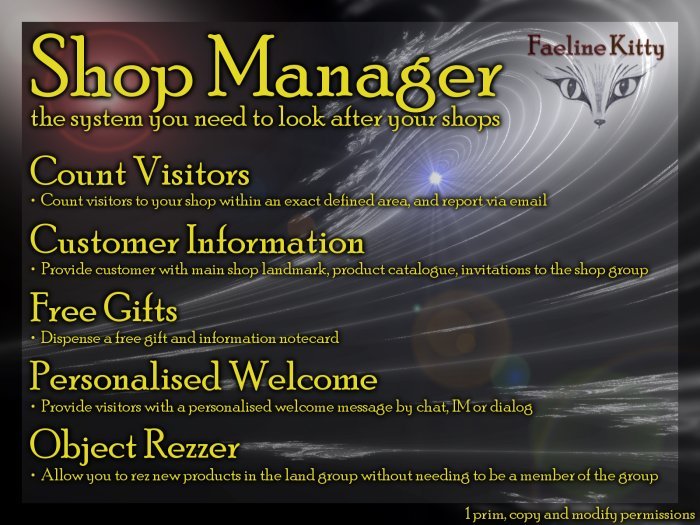
- Count visitors to your shop within an exact defined area, and report via email
- Provide customer with main shop landmark, product catalogue, invitations to the shop group
- Dispense a free gift and information notecard
- Provide visitors with a personalised welcome message by chat, IM or dialog
- Allow you to rez new products in the land group without needing to be a member of the land group
All options can be switched on or off.
The system includes full user documentation, is fully menu driven, single notecard setup and includes 4 example configurations.
Copy and modify permissions so you can use it at any number of locations.
CUSTOMER INFORMATION
When a visitor to the shop touches the "Shop Manager" object they will get a menu with up to 5 buttons.
Group Invitation
When the menu "Group" button is pressed a link to your shop updates group and your personalised message will be shown in the Local Chat window.
Landmark
The "Shop Manager" object can be used to hand out a landmark to your main shop which is added to the "Shop Manager" inventory.
Show Product Catalogue
Your online catalogue can be shown, for example on the Second Life Marketplace, by opening a web page.
Free Gift
The "Shop Manager" object can be used to dispense free gifts. Simple add the gift object to the "Shop Manager" inventory and change the settings notecard.
Information Notecard
The "Shop Manager" object can be used to give out a notecard to visitors for example for business information or product. Add the notecard to the inventory of the "Shop Manager" object then change the settings notecard. You can also personalise the menu text.
WELCOME MESSAGE
Visitor Message
Visitors to the shop can be welcomed, when they enter the defined shop area, with one of 3 types of welcome: Chat, IM or Dialog. You can also personalise the message with the visitor's first name or full name.
Floating Text
You can set some floating text in any colour which appears just above the centre of the "Shop Manager" object.
REZZING NEW OBJECTS
When you rent a shop you will usually need to be a member of a group and items you place in the shop will need to be set to the land group or they will get auto returned. Given that there is a limit of 25 group memberships this can cause problems especially if you’d like to reserve a number of groups for social or other purposes.
The group object rezzer function allows you to rez new or updated items with the land group set without yourself needing to be a member of the group.
Drop an object from your inventory onto the "Shop Manager" object while holding down the Ctrl key. It should have a red highlight border when you drop. The object you drop will be rezzed in front of the "Shop Manager" and will have the correct land group set.
VISITOR COUNTER
Visitors to your shop are counted when they enter the shop area you define. Any person will be counted only once a day, but the same visitor will be counted again on another day. Managers are excluded from the visitor count.
Each day the number of visitors is remembered and at the end of each month an email report of the number of visitors each day is sent to a number of email recipients.
There is also the option to send interim reports containing visitor counts for each day in the month so far. These can be set to any frequency, for example every day or every week, and it may go to different email addresses to the monthly report.
There is also an option to show the visitor names today.
Shop Area
You define the shop area as max and min x value (east/west) and max and min y value (north/south) in region coordinates.
This is the area for which you want to count visitors such as the floor area plus a bit outside for window shoppers.
The make it easier to work out these numbers you can use the "Shop Area Marker" prim which can be obtained from the "Shop Manager" with the "Area Object" menu button.
Detection
The "Shop Manager" will scan for new visitors periodically. The scan has a maximum range of 96m, but will scan only the smallest area necessary to cover your shop area. You can set the frequency of the scan to minimise lag and minimise the risk of missing a visitor.
CHANGING THE OBJECT LOOK
The "Shop Manager" can be any object you like in your shop. It comes in a variety of example shapes and sizes but each is fully modifiable so can be changed. It can also be part of a multi prim object with the scripts in the root object prim or a child prim. You can also put the inventory content into another object or your own making.
The "Shop Manager" could be your main shop sign, a plaque on the wall, a sculpted pin on the ground or a highly visible animated object with particle effects.
See item in Second Life- Count visitors to your shop within an exact defined area, and report via email
- Provide customer with main shop landmark, product catalogue, invitations to the
- Dispense a free gift and information notecard
- Provide visitors with a personalised welcome message by chat, IM or dialog
- Allow you to rez new products in the land group without needing to be a member o
