
having a SALE !!
please check out my other items too.
Thank you for your interest in my product.
Please read this before purchasing.
By purchasing this product, you are agreeing to the following terms of use.
+-+-+-+-+-+-+
Included
+-+-+-+-+-+-+
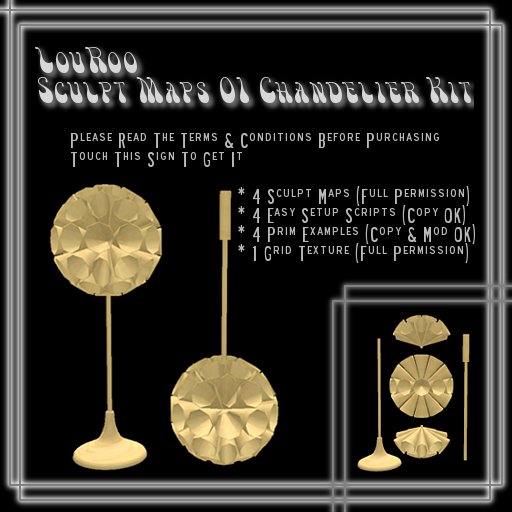
- 4 Sculpt Maps (Full Permission)
LouRoo_SculptMaps01_A
LouRoo_SculptMaps01_B
LouRoo_SculptMaps01_C
LouRoo_SculptMaps01_D
- 4 Easy Setup Scripts (Copy OK)
Drag&Drop Me on your prim_01_A
Drag&Drop Me on your prim_01_B
Drag&Drop Me on your prim_01_C
Drag&Drop Me on your prim_01_D
- 4 Prim Examples (Copy & Mod OK)
- 1 Grid Texture (Full Permission)
+-+-+-+-+-+-+
Settings
+-+-+-+-+-+-+
Sculpt type setting
LouRoo_SculptMaps01_A : Plane
LouRoo_SculptMaps01_B : Plane
Texture setting
Repeats Per Face
Horizontal : 255
Vertical : 4
Offset
Horizontal : 0.5
Vertical : 0.5
Sculpt type setting
LouRoo_SculptMaps01_C : Cylinder
LouRoo_SculptMaps01_D : Cylinder
Texture setting
Repeats Per Face
Horizontal : 1
Vertical : 1
Offset
Horizontal : 0
Vertical : 0
* These are just usual values. You can adjust the values to fit your textures as you like.
+-+-+-+-+-+-+-+-+
Easy Setup
+-+-+-+-+-+-+-+-+
This is an easy setup your sculpt prim with the Easy Setup Script.
1, Create a new prim.
2, Drag & Drop the Easy Setup Script on it from your inventory.
3, Click it.
4, Drag & Drop your texture on it.
5, Set your permission on your prim CAREFULLY.
(please DO NOT DISTRIBUTE IT with FULL PERMISSION or with COPY/TRANSFER simultaneously.
More on this later. It is also for protect your investment.)
* After drag & drop the Easy Setup Script on your prim, your prim will say to guide you (it says to only the owner ). So you just only do drag & drop on your prim without thinking about Sculpt type setting or Texture setting values. Your prim will be changed the shape to be a sculpt prim and it will be set all parameter automatically by the Easy Setup Script.
* After drag & drop the Easy Setup Script and click on your prim, the Easy Setup Script will disappear automatically from content of your prim.
* If you misstake to drag & drop the Easy Setup Script on something other prim, please don't panic, the prim never be changed if you never click. So you just delete the Easy Setup Script in content tab of Edit window of your prim before clicking. This is why need an act of click.
+-+-+-+-+-+-+-+-+-+-+
Very Important!
+-+-+-+-+-+-+-+-+-+-+
By purchasing this product, you are agreeing to the following terms of use
Please respect my terms of use.
:::ALLOWED:::
- Use the Sculpt maps/Scripts/Prim Examples/Textures of this package in your own creations/builds is ALLOWED.
- Sell or distribute your creations/builds which is used the Sculpt maps/Scripts/Prim Examples/Textures of this package as your personal product which CAN NOT BE COPY & TRANSFER simultaneously is ALLOWED.
It means...
OK = Mod
OK = Copy
OK = Transfer
OK = Mod/Copy
OK = Mod/Transfer
DO NOT = Copy/Tranfer
DO NOT = Mod/Copy/Transfer
:::NOT ALLOWED:::
- Repackage, Resell or Distribute the Sculpt maps/Scripts/Prim Examples/Textures (also the copies of these) AS IS is NOT ALLOWED.
- Repackage, Resell, Distribute or Reuse the copies of the Sculpt maps/Scripts/Prim Examples/Textures AS IS outside Second Life is NOT ALLOWED. All items of this package are exclusively for Second Life.
- Sell or distribute your creations/builds which is used the Sculpt maps/Scripts/Prim Examples/Textures of this package as your personal product with COPY & TRANSFER simultaneously is NOT ALLOWED.
+-+-+-+-+-+-+-+-+-+-+-+-+-+-+-+-+-+-+
Tip about Better View Sculpt Prim
+-+-+-+-+-+-+-+-+-+-+-+-+-+-+-+-+-+-+
1, Open the Advanced menu (Ctrl-Alt-D on a PC, or Opt-Ctrl-D on a Mac.).
2, Click on "Advanced" and choose "Debug Settings".
3, Copy & Paste this word "RenderVolumeLODFactor" in the text space.
4, Change the value to 4.0〜5.0
5, Close the Debug Settings window.
What is the Debug Setting?
http://wiki.secondlife.com/wiki/User:Torley_Linden/Debug_Settings
Thank you.
LouRoo Rau
Release date: 2010. 06. 22. Tue.
Updated:2018.7.


