
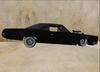
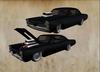
********** GS CREATIONS 1965 **********
DRIVE & HYDRAULIC
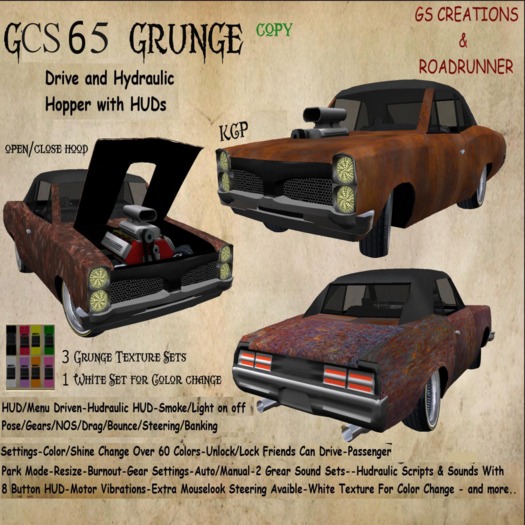
*Menu driven - Advanced physics and handling with menu-driven control over most performance settings
*Menu adjustable controls system
*HUD driven
*3 Grunge texture sets
*Shine/Color change - over 60 colors .
*Camera settings
*32 Prims
*Hydraulic scripts and sounds with HUD
for jump or to place the Impala deeper and higher
play with the HUD to make you best configuration .
*Lock / unlock
*Open/close motor hood
*Passenger on/off
*Exhaust smoke on/off
*Brake light
*Alarm on/off
*Light on/off
*Drive lefr/right pose - idle pose - park pose -
*Start / stop engine
*Horn
*Turning wheels
*Flight mode
*Burnout
*Drag
*Speedo
*Reboot
*2 sound sets
*NOS
*Eject
*Automatic / manual
*Get hud button
*Group access
*Resize - integrated root script resizer ,adjustment your Avatar
*5 sit pose - drive , left/right , idle , park.
*Sit position adjust [Passenger seperat - click left the seat]
*5 gears + reverse
*Contol Settings for : Gears-Brake-Banking-Steering-Skid-Boost-Bounce and more
*Rename
*Volume + -
*Park mode
*Extra Mouselook Steering
*Turbo on/off
*Park mode
Hydraulic HUD :
Use the HUD to control the hydraulic suspension or chat commands .
** Hydraulic :
The Hydrailics can be controlled per hud .
8 Buttons to stear the hydrualic jumps :
-Front left
-Front right
-Back left
-Back right
-Front axle
-Back axle
-Bounce
-Low
Hydraulics :
FA/BA Power : Small - Medium - Strong - Crazy
Jump Power : Weak - Normal - Very Strong
Use the HUD to control the hydraulic suspension or chat commands
Drive HUD :
The vehicle can be operated by touch menu, or with the KCP Driver HUD. The driver HUD gives you quick access to 36 operation functions via expandable menu bars, from basic light, gear change, and alarm on/off functions, as well as extended functions such as loading pre-set camera settings, swapping park poses, or activating racing commands like track alignment or position record and recover. The vehicle owner (or guest driver) can retrieve a copy of it from the vehicle's pop-up menu system. Vehicle owners must touch or mount the vehicle with their Driver HUD attached in order to connect it to the vehicle. The Driver HUD disconnects automatically when exiting the vehicle, but the owner can simply touch the vehicle again to re-connect. Guest drivers (non-owners) must be seated on the vehicle in order to use a Driver HUD.
Play with the settings for you best drive.Look for Steering ,Bounce, banking under controls .
*This complete system overhaul takes advantage of new SL scripting commands, and many previous issues and quirks have been fixed and performance is greatly improved
1 Drag mode is switched on through the Menu or HUD. It puts the car in a special high-speed physics mode. You want to switch this on just before you race, not for casual driving. Set your car in a very high gear, switch on Drag Mode and go .
2Resizer System :still works in conjunction with the park routine. The resizer system even adjusts the bike's main performance settings accordingly. Resizing the car also makes the car automatically adjust the basic performance settings.
3Group Access is turned on/off from the menu, it unlocks the car for anyone wearing the same group tag the car is set to.
4 POSES SETUP TOOL for easy adjust your poses.(Pasenger Pose adjust if Passenger sit .Click the seat and change position.
- Menu adjustable controls system! Change gear settings, add & remove gears, brake level, skidding, steering sdjustments, NOS level and more - all from the user menu!
- Menu-adjustable BOOST level. Controls overall power for your existing gear set!
- Optional menu-adjustable camera module! Adjust and customize your camera settings.The bike has a camera function with two memory locations.
7Menu driven Avatar positioning - no typing required
8Passenger : Can be turned off from the main menu and passenger can be ejected.Pose adjust and camera adjust.
9 Automatic brake light, and switchable headlight.
and much more
Driving
To drive the car right click it and select the option from the pie menu.
Use the arrow keys to accelerate, brake, and steer.
To shift gears, press the SHIFT key and the left or right arrow key.
To drive in reverse you will need to select reverse gear
For sharp turns at speed, skid out by pressing the back arrow while turning.
Click on the car for the menu system. From here you can access the customization options and position adjust as well as the lock system and handling options.
Test drive in my shop on Amat.
By questions please IM me . Garry Sporg
- Menu/HUD , Park Routine
- Hydraulic Hud ,
- Resize , Passenger , Contol/Camera Settings
- Idle/Run/Park/left/right Pose , Burnout , Auto-Manuel
- Pose Position Setting and many more...


Was ein Auto
Sowas hätte ich gerne in echt. Das Auto ist echt toll, der Look und die Aufmachung und für den Preis ist es wie geschenkt...
![[GS] Chopper Executors [Motorcycle Bike ]](https://slm-assets.secondlife.com/assets/4429994/view_small/GS%20CREATIONS%20Executors4.jpg?1318719485)

![[GS] Wedding Sidecar Motorcycle](https://slm-assets.secondlife.com/assets/4556666/view_small/GS%20CREATIONSWhiteAngel4.jpg?1320715344)
![[GS] 66 Drive & Hydraulic Lowrider](https://slm-assets.secondlife.com/assets/7345509/view_small/GS_CREATIONS_GSO2.jpg?1363362649)
![[GS] Grunge Hot Rod -Texture & Color/Shine Change](https://slm-assets.secondlife.com/assets/4728139/view_small/GS%20CREATIONSGRUNGR%20HOTROD1.jpg?1323373915)
![[GS] Hot Rod Classic](https://slm-assets.secondlife.com/assets/4728207/view_small/GS%20CREATIONSHOROD23.jpg?1323374748)
![[GS] 60s GTG Drive & Hydraulic Lowrider Cabrio](https://slm-assets.secondlife.com/assets/7345769/view_small/GS_CREATIONS_DCS65-2.jpg?1363365405)
![[GS] Grunge IMC Drive & Hydraulic Lowrider](https://slm-assets.secondlife.com/assets/7345370/view_small/GS_CREATIONS_IMCGrunge2.jpg?1363361198)