Greetings and thank you for your interest in the
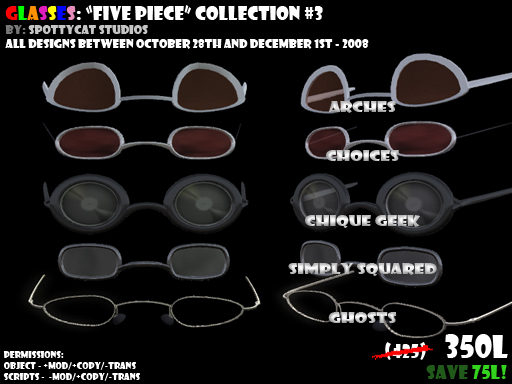
Glasses: Five Piece Collection #3 - Released on Dec 1st 2008
This collection contains the 16th-20th pairs of Kani-Fit glasses by the lenscrafter, Tasho Fairplay of Spottycat Studios and additionally a pair by Kitsu Nico as a guest appearance.
All refits as of the time of packaging this have been included and listed below.
The third five-piece collection contains:
Arches (Kani-Fit)
Arches (AV_Fox-Fit)
Chique Geek (Kani-Fit)
Choices (Kani-Fit)
Ghosts (Kani-Fit) - Designed by Kitsu Nico
Simple Squared (Kani-Fit)
&
Now Compatible Color-Picker-Enabled Versions of Chique Geek, Ghosts & Simply Squared
(Which is to say that all glasses contained within will work with the color picker, whereas the three pairs listed above did not previously have the script included.)
All glasses labeled with a `+` on the end of the name are scripted for the color-picker
I think that you'll find that all five of these pairs are much more friendly for modification and fitting them to avatars that my previous designs have not really fit all that well.
If you have any requests for custom fit glasses from these designs, feel free to let me know. I'm sure we can work something out non-exclusive for a minimal fee.
I've included information regarding the color picker below, as it is still in it's beta stages, please use it as directed. :3
Yours Truly,
Tasho Fairplay of Spottycat Studios
---------
Color Picker Information
---------
Anywho, here's what you need to know. Please read carefully because if you ask me questions regarding stuff listed in here, I reserve the right to scold you or tell you to read the notecard. >:3
IMPORTANT NOTES:
* To use the hud functionality, wear the included HUD and the glasses labeled `+CP` (colorpicker).
*
* When you equip the hud, it should be just barely off of the screen, and it only plays friendly on the right side. It must be worn on the right side to function as intended. This may be changed in future releases, but will not be at this time. - please do not contact me regarding bugs related to using the hud in spots other than the default attachment point.
* TO ACTIVATE THE HUD: Click on the glasses, or type the command ` /4 color ` - choose an object group from the menu, select the color on the hud and click the checkmark.
* The HUD will time out after 2-3 minutes if for some reason it goofs up.
* If for some reason you cannot see the hud even after you've equipped it & activated it, and it's in the default attachment point, you will need to edit your HUD placement. It's recommended that you place the left edge of the hud just barely off to the side of the screen.
KNOWN BUGS:
* Due to an LSL code screw-up, it is sometimes required that you must click the glasses twice in order to get the pop-up menu.
