**Set updated for free to PBR**
Learn More about the Free PBR Project
https://www.flickr.com/photos/hlokenende/53663016938/in/pool-cerridwenscauldron/
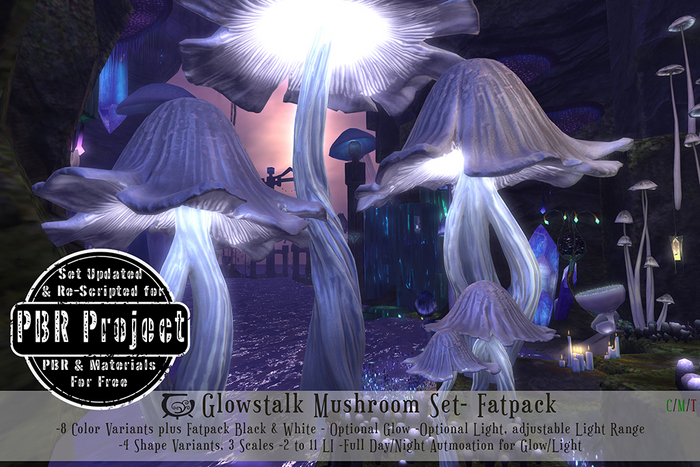
...During our explorations in the Fen's misty wetlands, we had encountered a staggering variety of mushrooms. Yet, just when we thought we'd seen it all, we stumbled upon the striking Glowstalk mushroom. This colossal fungus earned its name from the intricate, luminous fibers that composed its sinuous stalks. These fibers exhibited a peculiar behavior, occasionally splitting into two or even three separate stems, only to reunite at the cap, which was adorned with ragged, flared contours. While the woody cap itself emitted only a faint luminescence, the gills beneath it glowed intensely.
The whole impression that this unique species gives is of ebb and flow, a reminder of the own rythms of the Fen's life cycles.
-The Shimmering Fen
The Apprentice's Journal
*
CONTENTS:
All contents are copy/mod but scripts, which are only copy.
*Note on L.I. (Land Impact): As with all mesh content, the L.I. will increase with size. Each size has optimized Land Impact and Levels of Detail (how the mesh deteriorates with distance) for the respective size. For tips on how using the different scale variants see Mod Notes. Large scale variants have accurate physics caps and the stalks have approximately accurate collisions to make the suitable for roleplaying and environment interaction.
[CC] Glowstalk Mushroom, Var 1, Small Scales- 2 LI
[CC] Glowstalk Mushroom, Var 2, Small Scales- 2 LI
[CC] Glowstalk Mushroom, Var 3, Small Scales- 2 LI
[CC] Glowstalk Mushroom, Var 4, Small Scales- 2 LI
[CC] Glowstalk Mushroom, Var 1, Med Scales- 3 LI
[CC] Glowstalk Mushroom, Var 2, Med Scales- 3 LI
[CC] Glowstalk Mushroom, Var 3, Med Scales- 3 LI
[CC] Glowstalk Mushroom, Var 4, Med Scales- 3 LI
[CC] Glowstalk Mushroom, Var 1, Large Scales- 11 LI
[CC] Glowstalk Mushroom, Var 2, Large Scales- 11 LI
[CC] Glowstalk Mushroom, Var 3, Large Scales- 11 LI
[CC] Glowstalk Mushroom, Var 4, Large Scales- 11 LI
*
INSTRUCTIONS:
The Mushrooms are activated through a click and hold pop-up menu to avoid accidental menu activations in active landscapes. A short click will NOT activate the menu. A click-and hold for approximately 2 seconds is necessary to activate it.
ALL: Change all the Mushroom Parts (cap, stalk and light color) to 10 Different color choices, Red, Orange, Yellow, Green, Teal, Blue, Purple, Pink and Fatpack Bonuses White And Black. Changes will affect Light color and Spore Particles color even if these options are off.
Cap: Change the Mushroom´s cap to 10 Different color choices, Red, Orange, Yellow, Green, Teal, Blue, Purple, Pink and Fatpack Bonuses White And Black.
Stalk: Change the Mushroom´s stalk to 10 Different color choices, Red, Orange, Yellow, Green, Teal, Blue, Purple, Pink and Fatpack Bonuses White And Black.
Light Color: Change the Mushroom´s light to 10 Different color choices, Red, Orange, Yellow, Green, Teal, Blue, Purple, Pink and Fatpack Bonuses White And Black. Changes will affect the light color even if the light is off.
Light Range: The default light range is 1mt, the lowest setting. But you can adjust it by hand. to the options in this sub menu. Min is 1.0 mt and Max is 20.0 mts
Light: On/Off Switch. Turns on/off the light effect in the mushrooms basket. If the Light Option is on and the Day or Night Cycle options are activated, the light will turn on automatically during the day/night.
Glow: On/Off Switch. Turns on/off the glowing effect in the basket and stalk. Advanced Lighting required. Like the Light and Spore options, if this option is on and the Day or Night Cycle options are activated, the glowing effect will turn on automatically during the day/night.
Day: Automates Light and Glow, or any combination of these during your region/parcel Day! This option detects the position of the sun in your parcel/region according to the horizon. If the sun position is fixed this option will not work.
Night: Automates Light and Glow, or any combination of these during your region/parcel Night! This option detects the position of the sun in your parcel/region according to the horizon. If the sun position is fixed this option will not work.
ScriptDel: Will delete the Control, Changer and Sun Check scripts after confirmation. You will not be able to do further changes to any settings once scripts are deleted, unless you put a copy back of the scripts in the root prim. You also have the option of just deleting the Sun Check Script if you are not planning on using the automatic Day or Night options
Close: Will close the pop-up menu and set the script to sleep. The script will automatically go to sleep too after 2 minutes without receiving a command. Click again to reactivate.
*
Buy Inworld for 10% Off!
- Original Beautiful Mesh, Materials Enabled
- 4 Shape Variations, 3 Scales
- 8 Color variations selectable by part + black and white
- Adjustable optional glow, light, light range and more
- Full Day-Night Light & Glow Automization


