
CASPERLET SIGN INSTRUCTIONS
~~~~~~~~~~~~~~~~~~~~
WHAT YOU'RE GETTING:
~~~~~~~~~~~~~~~~~~~~
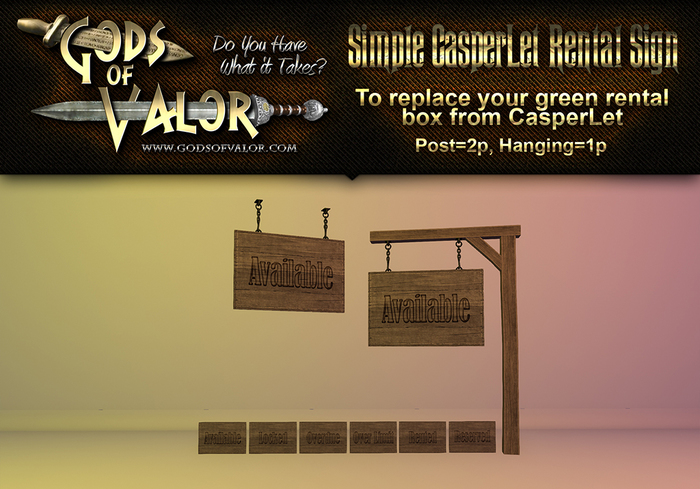
OK ... this is rather simple. In the folder you received 2 copy/mod versions of this sign:
1. Gods of Valor - RUSTIC CasperLet Rental Sign (post) = stands on ground/floor
2. Gods of Valor - RUSTIC CasperLet Rental Sign (ceiling) = hangs from the ceiling
Inside each of those signs are 6 copy/mod textures as follows:
1. TEX-available
2. TEX-locked
3. TEX-overdue
4. TEX-overlimit
5. TEX-rented
6. TEX-reserved
First, never rename the textures or CasperLet wont work.
Second, if you remove them from within the sign object, your sign wont work, so leave them inside it at all times.
Third, don't unlink the sign or it may not work right.
~~~~~~~~~~~~~~~~~~~~
WHAT TO DO NOW:
~~~~~~~~~~~~~~~~~~~~
OK ... Once you take possession fo your new signs, all you need to do is
1. Pull the CasperLet script out of any CasperLet rental box you're currently
using and put it into your new sign.
2. Click the button that enables the sign/rental box to accept payments
(that pesky money permissions thing).
3. Setup your sign as you normally would any rental box.
WHAT TO DO IF IT ISN'T SWITCHING OUT THE SIGN WORDS:
This "could" occur when you first put the script in. The way I fixed it with my own was to go to the config page for that sign/box and click the "locked" and "reserved" options to turn them on and off. Something about that seems to make the sign say "oh, yeah, that's what I do" lol.
~~~~~~~~~~~~~~~~~~~~
FOR OTHER CASPERLET ISSUES
~~~~~~~~~~~~~~~~~~~~
Please join the Casper help group and/or go to the Casper Wiki's for help with their scripts. I am not part of Casper and therefor do not offer tech support on their products.
Thank you very much for your business, I look forward to working with you again!
All my best,
Filipa Thespian
Gods of Valor
www.GodsOfValor.com

