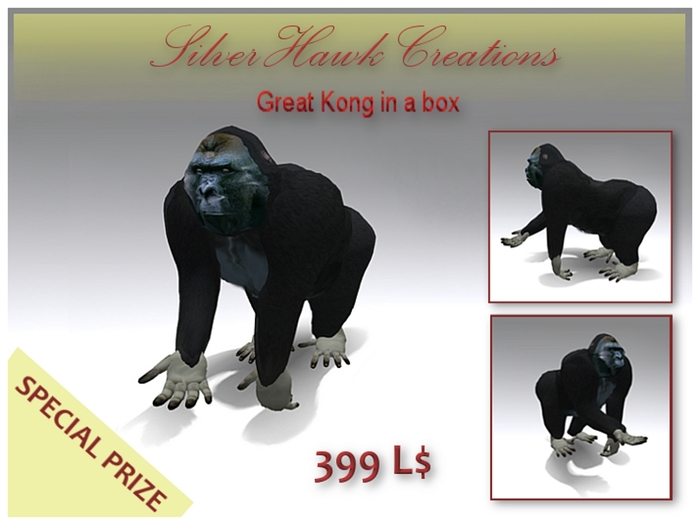

Great Kong (SilverHawk Creations)
ITALIAN/ ENGLISH
__________________________________________
ITALIANO
Questa è la riproduzione realistica di un grande gorilla, realizzato con singoli pezzi sculpted e textures ad alta definizione. Nella versione non comprensiva di resizer è inclusa l'ombra riflessa sul terreno. L'oggetto non contiene animazioni e suoni.
Numero totale prims: 41
Nel box si trovano:
1 copia di grandi dimensioni del gorilla, completa di ombra sul terreno non trasferibile e non modificabile
1 copia del gorilla che contiene lo script resizer non trasferibile e non modificabile
Toccando la copia comprensiva di resizer si aprirà un menu dal quale si potrà scegliere la grandezza del gorilla.
Si consiglia di eseguire una copia di backup di entrambi gli oggetti prima di rezzarli e modificarne le dimensioni.
USO DEL MENU RESIZER:
1. Una volta rezzato l'oggetto "Great Kong with resizer" (dopo averne fatto una copia in una cartella che denominerete "backup") cliccate sull'oggetto ed apparirà un menu.
2. Utilizzare le varie opzioni per "scalare" la grandezza dell'oggetto
3. Per ripristinare la grandezza originale utilizzare il pulsante RESTORE del menu
4. Al termine del ridimensionamento, potete utilizzare la funzione DELETE, per rimuovere lo script da questo oggetto.Questo può essere utile per limitare la lag.
Per ogni informazione potete contattarmi in world
DoctorHawk (Lord Hawk)
__________________________________________
ENGLISH
This is the realistic reproduction of a large gorilla, made with sculpted pieces and high definition textures. In the folder you will find a version with resizer and another version without resizer that not includes the resizer and has the reflective shadow on the ground. Both versions do not contain any animations or sound.
Total prims: 41
CONTENTS OF THE BOX:
- a large copy of gorilla, complete with shadow on the ground (no transfer - no modify)
- a copy of the gorilla with resizer script (no transfer - no modify)
Touching the copy including resizer will open a menu from which you can choose the size of the gorilla.
Make a backup copy FIRST of both objects before putting them on the ground and change their size.
USE OF RESIZER MENU:
1. After you have put on the ground the object "Great Kong with resizer" (after having made a copy in a folder called "backup"), click on it , and a drop down window will appear.
2. Use the Scale Tab options as you like.
2. Restore Tab, will restore to the original settings.
3. Maximum Size and Minimum Size ... do what they say.
4. Delete will remove the Script from this object.
5. After resizing, delete the script, as having no scripts is best for teleporting and lag.
For further information please contact me in-world
DoctorHawk (Lord Hawk)


