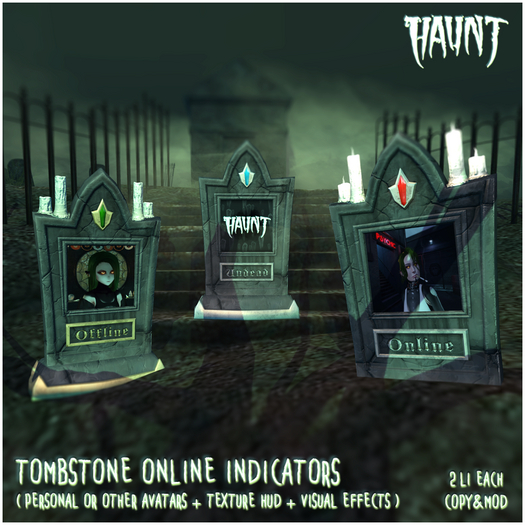

Let the mortals know when you are around in style...
▓▓▓▓▓▓▓▓▓▓▓▓▓▓▓▓▓▓▓▓▓▓▓▓▓▓▓▓▓▓▓▓▓▓▓▓▓▓▓
Online indicator for yourself or another avatar, tracks when avatars are online and represents it with various visual effects or changes.
NO CANDLES: The small plaque at the bottom will change and the upper gem will light up if the avatar is online.
WITH CANDLES: The small plaque at the bottom will change, the upper gem will light up, and the candles will also light if the avatar is online.
ALWAYS ON CANDLES: The small plaque at the bottom will change and the upper gem will light up if the avatar is online, the candles stay lit constantly
Materials Enabled + Texture change HUD
2 Li each, mod/copy/no trans
▓▓▓▓▓▓▓▓▓▓▓▓▓▓▓▓▓▓▓▓▓▓▓▓▓▓▓▓▓▓▓▓▓▓▓▓▓▓▓
HOW TO USE:
FOR YOURSELF:
-To use it for yourself just drop an indicator out and it will use your own KEY to track when you are online/offline.
-Drop/apply any texture/image you want to use in the main square.
FOR SOMEONE ELSE:
-If you want to use the indicators for another person you will need their KEY, this is the string of letters and numbers under their name when you open their profile.
-Copy the avatars KEY
-Right click and EDIT the indicator you what to use.
-Paste the KEY of the avatar in the DESCRIPTION box for the indicator.
(This is the text box on the *FIRST* tab of the build window, *UNDER* the objects Name)
-Click and hold for more and 1 second on the indicator and it will reset its self to the new avatars KEY.
-Drop/apply any texture/image you want to use in the main square.
*INDICATORS CHECK TO UPDATE AFTER 60 SECONDS AUTOMATICALLY, BE PATIENT IF YOU JUST LOG IN AND IT SAYS OFFLINE*
▓▓▓▓▓▓▓▓▓▓▓▓▓▓▓▓▓▓▓▓▓▓▓▓▓▓▓▓▓▓▓▓▓▓▓▓▓▓▓
TO TEXTURE CHANGE:
Each indicator will listen to the texture change HUD for 10 seconds once activated.
This is so that you can have multiple out with various combinations for multiple avatars.
HOW TO ACTIVATE:
If the tombstone HAS candles: TOUCH THE CANDLES and stand within 20m of the tombstone.
If the tombstone does NOT have candles: TOUCH THE GEM in the upper front and stand within 20m of the tombstone.
▓▓▓▓▓▓▓▓▓▓▓▓▓▓▓▓▓▓▓▓▓▓▓▓▓▓▓▓▓▓▓▓▓▓▓▓▓▓▓
Hey, Hi, Hullo...
Thank you for shopping at HAUNT!
If you encounter any problems please do not hesitate to reach out to us so we can troubleshoot ASAP and help you out!
Always include your Full name and as much info on the issue as possible.
-What happened?:
-When did it happen?:
-Were you on private or mainland?:
-Have you also informed a CSR or the Main store Account?:
(Haunt Incognito)
Haunt, Management & Staff
See item in Second Life- Texture Change
- Online Tracking


