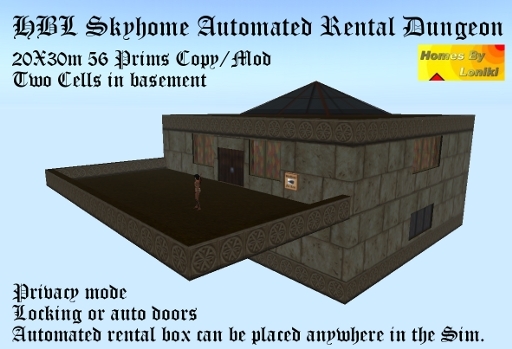
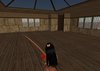
I made this origonally for myself and still use it as my private residence.
This is a rental skybox. It is 20x30m and 56 prims with the rental box. The rental box can be placed anywhere in the sim and renters are directed to it by landmark. You assign a unique code to each rental box and pod and can set up as many of these as you need. Each has privacy mod, locking or auto doors, two cells in the basement.
Oh, see if you can find the secret compartment :)
----------------------------------------
Setting up your Automated Rental Center Board
This unit is made up of many boxes and is linked together, do not unlink it.
To edit the contents of the individual rental boxes, do an edit on the Automated Rental System. Observe that the entire unit is highlighted. Check the "Edit Linked Parts" box in the edit window. Now click the rental box for unit one. Observe that it is the only part that is highlighted now. Click the "More" button on the edit window to open the bottom part of the edit window and check the "Content" tab. This window will display the contents of the highlighted rental box. Everything we edit for each rental will be done from this contents window.
Inside each Rental Box is a _config_ Card. Double click it in the contents tab to open it.
This card is easy to follow and has notations on it.
1)Unit Code. This is important as it is the code used by the rental box to communicate with the Pod. You can use any number between -99999999 and 99999999, but it must match the Skyhome! You must do an edit on the skyhome also and in its code card enter the very same number. For maximum security use a negative 8 digit number as in the example.
2) The next step is your email, enter it in place of the myname@mydoman.com. Leave this unchanged if you do not wish to be notified by email of rental activity.
3) This is the Info Notecard. This is given out to perspective renters. If your rental box is separate from the skyhome, this is where you place a landmark to the Pod so they may go to it and view it. It is important to edit this notecard and include landmarks and rental information.
4) This is the Rules Notecard. You can leave this but observe that there is a Rental Rules notecard also in the contents tab. It is generic and you can edit it as desired. You may also want to add a Landmark to this card incase they rented without getting the info card.
5) The next entry is the rental_notecard. This is what is given out when a tenent rents a unit. In this case it is named Door Instructions and instructs them on how to add users, etc, to their doors. This needs not be changed but you always have an option to add to this notecard or to change the name. If you change the name of this notecard or any other, make sure the notecard in the contents has the exact same name.
6) Rental Name. This is where you name your rental. This is important if you have more then one rental set up so you know what unit is what when you recieve status IMs.
7) Enter the Max Prims allowance. If you are going unfurnished you will want to have a prim allowance and a land group set up. If you are renting your room fully furnished you may want to set this to 0 (zero).
8) Rental amount per week. rent_price is the weekly rental price.
9) Minimum Weeks. The minimum amount of weeks a person can rent the unit for. (This effects the minimum rent for a person to move in as it multiplies the weekly rent.)
10) Maximum Weeks. The default is set to about two months.
-----------------------------Optional Section-----------------------------
11) You are the Manager by default and your name is given to tenents as a point of contact. If you
want a different person's name given to tenents, you must remove the # in front of this option and
enter a name.
12) If you are going to use a manager other than yourself, a Manager's key must be entered or they will not recieve messages from the rental system. You need to remove the # in front of the enter "manager_key". (The key is a code used by SL. Drop the "GetAvaKey", have them click it and copy and paste that code)
Ver el artículo en Second Life- Automated rental home
- large deck
- two cells in basement
- secret hiding place
- Can be used as a personal home also, non rental.
