
♦♦♦♦♦♦♦♦♦♦♦♦♦♦♦♦♦♦♦♦♦♦♦♦♦
What you get
♦♦♦♦♦♦♦♦♦♦♦♦♦♦♦♦♦♦♦♦♦♦♦♦♦
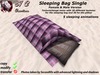
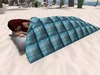
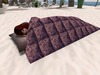
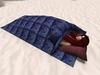
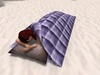
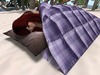
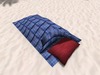
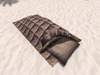
This set includes 2 Sleeping Bags Single. One female and one male version (the male version is a little bit bigger) with 5 sleeping animations.
.
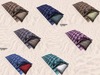
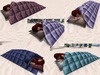
The sleeping bags has a texturechange menu with 20 textures for the sleeping bag and 20 textures for the pillow.
These texturechange menu has an ACCESS menu. The access level can be changed by the owner in the menu with the button [ACCESS]. Access cycles between OWNER, GROUP and PUBLIC.
I advise you to check the item in world before the purchase.
♦♦♦♦♦♦♦♦♦♦♦♦♦♦♦♦♦♦♦♦♦♦♦♦♦
Specification
♦♦♦♦♦♦♦♦♦♦♦♦♦♦♦♦♦♦♦♦♦♦♦♦♦
♦ HCC Sleeping Bag Single (female)
♦ HCC Sleeping Bag Single (male)
Permission: Copy/modify (animations, notecards and scripts are copy only)
Prim: 2, Landimpact: 2
Textures: 20 for the sleeping bag and 20 for the pillows
Menu:
◆ BUTTON Textures
♦Singles (5 animations)
To sit right click on the sleeping bag. To get the menu touch again.
For changing the textures touch the sleeping and select another one or use the button "Textures" from the AVsitter menu when you sit on the sleeping bag.
♦♦♦♦♦♦♦♦♦♦♦♦♦♦♦♦♦♦♦♦♦♦♦♦♦
SOMETHING ABOUT PERMISSIONS
♦♦♦♦♦♦♦♦♦♦♦♦♦♦♦♦♦♦♦♦♦♦♦♦♦
Copy and modify permissions. If it says in your inventory that some items are no modify this is because of the scripts, notecards, props and animations which are no modify.
♦♦♦♦♦♦♦♦♦♦♦♦♦♦♦♦♦♦♦♦♦♦♦♦♦
QUALITY ANIMATIONS AND MENU
♦♦♦♦♦♦♦♦♦♦♦♦♦♦♦♦♦♦♦♦♦♦♦♦♦
No freebie animations! I have bought all the animations from the finest animators in second life. Most of the animations are between 30 and 60 second looped, fluid from beginning to end and most have priority 4 or higher.
I try to fit my funiture perfectly with the AVSitter Menu.
♦♦♦♦♦♦♦♦♦♦♦♦♦♦♦♦♦♦♦♦♦♦♦♦♦
QUALITY TEXTURES
♦♦♦♦♦♦♦♦♦♦♦♦♦♦♦♦♦♦♦♦♦♦♦♦♦
No freebie textures! I have bought all the textures from the finest texturemakers in second life or I made the textures myself.
♦♦♦♦♦♦♦♦♦♦♦♦♦♦♦♦♦♦♦♦♦♦♦♦♦
QUALITY SCULPTS AND MESH OBJECTS
♦♦♦♦♦♦♦♦♦♦♦♦♦♦♦♦♦♦♦♦♦♦♦♦♦
WHAT YOU NEED TO KNOW ABOUT A MESH OBJECT.
1. You need to have Viewer 3 or some else viewer compatible with meshes to see properly a mesh object.
2. Mesh are not like prims, if you resize or linking/unlinking a mesh could increase the prims count.
3. Item is linked and setted to optimize the LI count. Of course items are mod, so you are able to unlink them, but keep in mind that by doing this, will increase the LI.
4. Mesh textures dont work like textures of prims, because usually mesh have only some faces or just one.
Saying all this, be careful how you change and modify your item and enjoy it :)
♦♦♦♦♦♦♦♦♦♦♦♦♦♦♦♦♦♦♦♦♦♦♦♦♦
Please visit the ..:HC Creations:.. inworld mainstore.
UPDATE GROUPS: ..:HC Creations:.. inworld group members receive rewards credits on all products - minimum 10% - (inworld store only) which can be redeemed on future purchases, other benefits include special sales and occasional group gifts, for a small join fee of L$199. Previous gifts can be found in the Group Room. Group join sign is at the mainstore landing point.
Thank you for reading this listing!
If you have any question please send an email to Heavenly.Canucci@gmail.com or leave an NC at the mailbox in the mainstore.
Like us on FACEBOOK:
https://www.facebook.com/pages/HC-Creations-by-Heavenly-Canucci/476731082433181
Or
To get new informations about products and sales just add me at facebook
Have fun!
Heavenly Canucci
- AVsitter
- Texturewechselmenü


very nicely made
great for slumber parties, a very good value
Without words
A nice sleeping bag with nice animations and textures. And ist sooo cheap! Thanks again, Heavenly.

