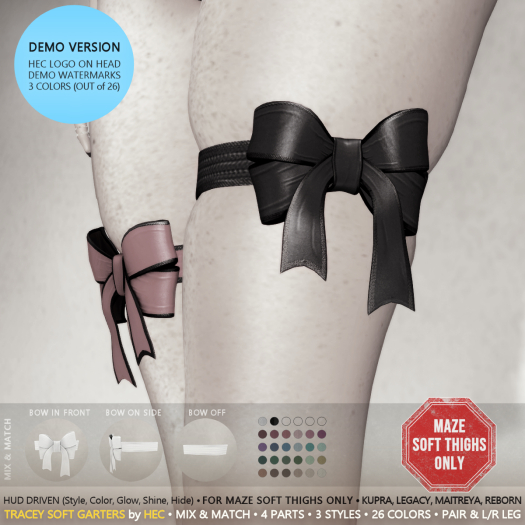


3 Colors (out of 26) Watermarked demo w/ HEC logo on head. Watermarks may hide details, shown otherwise.
____ A T T E N T I O N_____
The garters work ONLY with the MAZE Soft Thighs Add On (a separate purchase not related to HEC).
MAZE Soft Thighs: http://bit.ly/3EUcALo
flickr ad: https://flic.kr/p/2ok1N5E
HUD preview: https://gyazo.com/c3023529fe861af9f3ba3c4ab36d366f
To see the garters in all their glory, enable Advanced Lighting Model (ALM) in the Graphics preferences of your viewer and switch on the lights of the room (or use the included "Body Light Bundle for ALM Testing"). More info: https://goo.gl/1j6945
________ N O T E ________
For fit/visual issues, read [ FIT ] section, below.
For help with the HUD, read [ HUD DRIVEN ] section, below.
▄▄ [ FEATURES] ▄▄▄▄▄▄▄▄▄
4 parts per leg (bow main, bow trims, band main, band trims), 3 mesh styles per leg (bow in front, bow on sides, bow off), letting you mix & match 26 colors with adjustable glow, fullbright and materials (gloss and environment). Customizable either as a pair, or each leg separately.
▄▄ [ FIT for MESH AVATARS ] ▄▄
NOT FOR CLASSIC AVATARS!
Fit for MAZE SOFT THIGHS Add On of: eBODY Reborn, Inithium Kura, Maitreya Lara and Meshbody Legacy.
For each body you get 4 differently styled pairs, depending on the positioning of the bow (in front, on the sides, left front / right side, left side / right front).
*** In all cases, shape adjustments may be necessary (see also the note that follows)!
________ N O T E ________
For fit/visual issues, you may try any or all of the following:
• make sure you are wearing the MAZE Soft Thighs Add On for your body.
• take off any body Physics you may wear.
• make shape adjustments to the offending spots of your body
▄▄ [ HUD DRIVEN ] ▄▄
Preview: https://gyazo.com/c3023529fe861af9f3ba3c4ab36d366f
To process a part/group of the garters, first ACTIVATE it at the top of the HUD (the small overhead line will move accordingly). The picture thumbs correspond to both legs, while their L and R buttons correspond to the Left and Right leg respectively.
Activate the ALL group to process all parts at once, or activate any other part to process it individually.
Use the remaining options in the HUD with different active pars to get Mix & Match looks.
Use the Show and Hide buttons to change the mesh style (only available for ALL and BOW).
For example, click the BOW picture and hit Hide to remove the bow from both legs (hit Show to bring it back). Or click BOW's L button and hit Hide to remove the bow from the left leg only. Or click ALL's R button and hit Hide to remove the whole garter from your right leg only. And so on. If you mess up you can quickly bring back everything by clicking on the ALL picture, and then hit Show.
The Glow slider offers 15 levels of glowing for the active part (including "no glow").
The Fullbright button works as an On/Off switch for the active part, turning red when off and green when on (you may have to click twice).
NOTE that fullbright degrades greatly the textures quality!
The ADVANCED section can be used to adjust the Glossiness and Reflectivity materials of the active part. These effects need ALM to be enabled in the viewer.
The PRESETS section offers 26 color options for the active part.
See also the included 'HEC - Sample Universal HUD Quick Help' nc and the 'Sample Universal HUD Visual Guide' picture (the HUD may look different, but the general functionality remains the same).
▄▄ [ MATERIALS ] ▄▄▄
This is a Materials Enabled, 100% mesh item. It looks best with ALM enabled in the Graphics preferences of your viewer.
▄▄ [ INCLUDED ] ▄▄▄
• HEC HUD - to be used with any of the available sizes.
• HEC Sample Universal HUD Quick Help - helpful nc to get the most out of the HUD.
• HEC Sample Universal HUD Visual Guide - supporting texture for better understanding the HUD (your HUD may look different, but the functionality remains the same)
• Body Light Bundle for ALM Testing (unpack it separately) - 3 body-lights for testing HEC apparel when ALM is enabled in the Graphics preferences of your viewer.
• 4 eBODY Reborn styles
• 4 Inithium Kupra styles
• 4 Maitreya Lara styles
• 4 Meshbody Legacy styles
*** In all cases, shape adjustments may be necessary
____________________________________________________
All vendor pictures are genuine representations of the depicted items as they appear in Second Life, using the ALM setting in the Graphics preferences.
Thank you, and if you like the product, give it a review. It's greatly appreciated.
- Mix & Match
- Multiple Styles
- Adjustable Materials
- Pair and Separate Leg Customizable
- HUD Driven


