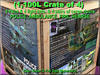
![[HRH] ALERT Set (FOUR CRATE)](https://slm-assets.secondlife.com/assets/35453667/lightbox/ALERT%28AD%291_001.jpg?1720654615)
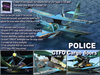
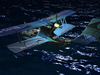
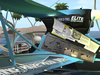
June 2024, Dani has made his planes MOD; up until now, to apply anything to his planes, they had to be worn - I have my scripter working; but presently, my add-on items are worn, not fixed to the plane. This will be resolved, but in the meantime, do enjoy, in the knowledge you will get the update.
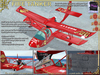
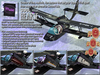
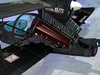
Aluminum access holes, metal seams, rivets, leading edges on the wings, carefully worked propellers, AVGAS labels, aircraft Identity markings, mildly dented underside of the watertight hull... and simulated cargo doors THAT APPEAR TO "OPEN" to reveal an empty/full interior cargo space as well as a third aircraft individual ‘trunk’ space. So now, when you Get The Freight Out, you have a place to put it (other than your passenger's lap).
This is the PAINT, and wearable items only. To get the plane itself, go to 'Dani Super D-Trel', found here: https://marketplace.secondlife.com/p/Super-D-Trel/19795703 , store location: http://maps.secondlife.com/secondlife/Sadoul/80/221/1301
In world store: http://maps.secondlife.com/secondlife/Fedoseev/205/207/250
YES, I have a FABULOUSLY Located hanger store at Unity/Pirate Air Airport, blue link at bottom of this page.
INCLUDED WITH THE PAINT, you also get:
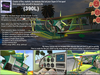
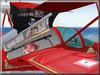
- GTFO cargo hold doors APPEARING TO BE 'OPEN' simulating an empty, and full cargo hold as well as shallow trunk space (3 distinctly different interiors) all controlled easily from a switch box inside the cockpit against the instrument panel (worn by the pilot, when sitting in the pilot's seat). Don’t try wearing these pilot wearable items up on the wing, or walking around – you’ll look funny.
You get a LIGHT switch set as well, also controlled easily from a switch box inside the cockpit against the instrument panel (next to the cargo button box) which are scripted to control:
- 1, slowly alternating (red/blue/purple/white) alert light sets against the Starboard upper wing.
- 2 powerful floodlights shining down on the cargo doors from under the upper wings.
- 5 Simple prim, wing, and tail bucket spotlights which softly illuminate the tail numbers for safety on the water, and flying at night. (Thanks to Michael Leon [smoothazndude] for scripting them.
- GTFO Rez cargo pile (to photograph your D-Trel with) – please don’t litter, take them up when done.
- Simple D-Trel instruction HUD that sits on your monitor (shows start up, shut down, autopilot setup, and gas pumping instructions). Right click, DETACH the HUD, when done with it (or slide it to a side monitor if you’ve got one).
The pilot (sitting in the pilot's seat) ADDs the prims (like clothing) to apply them to the plane (until the D-Trel becomes fully MOD (which it isn’t at present: Sept 28 2023). Repositioning these wearables is as easy as resetting your own HOVER height, sitting in the seat, until the pieces appear correct. They are MOD if more fine tuning is needed.
(3 Min) Repositioning Video: https://www.flickr.com/photos/142293901@N02/53770399870/
The prims are painted only, they are not actual cut out sections of the fuselage, so there is a best angle to view from. They’re meant only as a more realistic view of your D-Trel to carry freight in.
====================================================
REGARDING 'EDIT' MOVING YOUR D-TREL WHILE WEARING PRIMS
====================================================
WHEN SEATED IN YOUR D-TREL, AND YOU WANT TO EDIT MOVE/ROTATE YOUR PLANE - MAKE REAL SURE YOU ARE CLICKING ON THE PLANE, AND NOT ONE OF THE WEARABLES (you might just be clicking the luggage doors, and not the plane).
IN ANY PLANE/HELICOPTER, AVOID CHANGING CLOTHES, you have a tendency to pop out of the pilot seat, and sit on the front windscreen. EASY FIX: CHANGE YOUR HOVER HEIGHT into minus values to sit back down in the seat again, but for my wearable items, they require you land, get out, and back in again.
For 300L more per aircraft, I will repaint your own unique Tail &/or unit number over the four pieces that require it (and the box label). If you have a company name to add, or face photo you want included on the tail and wing, message me a clear closeup Head Photo (shoulders up) - do this BEFORE sending money, we'll chat, and clarify your requests (I'm really quite a nice vampire ......mostly).
Don't you think the D-Trel makes the most exciting smuggling/bootlegging/money moving aircraft in SL? Me too. I'll be adding those choice open cargo doors soon enough - look for them in my store. Become a smuggler today, give the law someone to chase.
Ver el artículo en Second Life Ver vídeo »- Easily convert your Dani Super D-Trel into these 4 gorgeous painted seaplanes
- You get button scripted simulated open Alert trunk space
- You get button scripted GTFO simulated deep looking cargo space (empty/full)
- You get button scripted alternating alert light sets, bright floodlights, and
- 5 soft bucket lights illuminating tail numbers on tail and wings

![[HRH] Hearse (DH&K) PAINT & WEAR (BOX)](https://slm-assets.secondlife.com/assets/34074253/view_small/%5BHRH%5D%20Hearse%28DK&H%29AD1Small.jpg?1696830557)
![[HRH] "FIRE Tanker" PAINT (D-Trel) & pilot seated wearables (BOX)](https://slm-assets.secondlife.com/assets/33931734/view_small/FIRETanker%28ADVERT%291%28small%29.jpg?1694314838)
![[HRH] "AMBULANCE" PAINT (D-Trel) & pilot seated wears (BOX)](https://slm-assets.secondlife.com/assets/34022812/view_small/%5BHRH%5D%20Ambulance%20%28AD%29small.jpg?1695936962)
![[HRH] POLICE PAINT (D-Trel) & pilot seat wearables (BOX)](https://slm-assets.secondlife.com/assets/34079811/view_small/%5BHRH%5D%20POLICE%28AD%29small.jpg?1696918194)
![[HRH] SMUGGLER Ambulance (BOX)](https://slm-assets.secondlife.com/assets/34229333/view_small/AmbulanceSmugglersCargo%28Ad%29_007.jpg?1699210062)