░░░░░░░░░░░░░░░░░░░░░░░░░░░░░░░░░░░░░░░░░░░░░
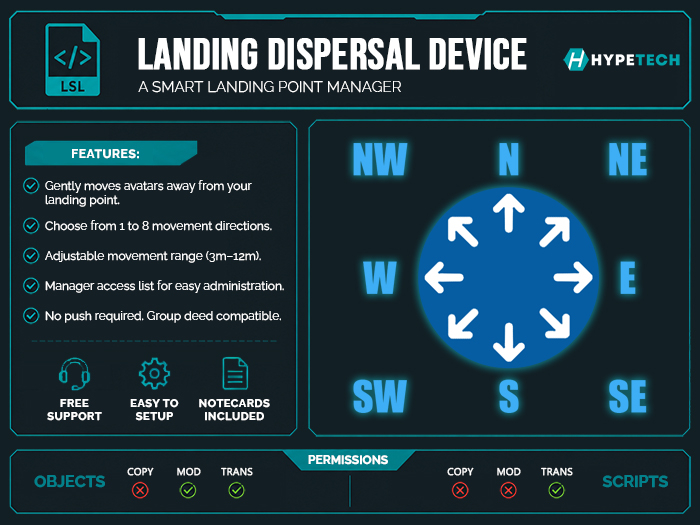
➤➤ Landing Dispersal Device is a useful device that gently moves people away from your landing zone if you have the required land permissions.
It is not necessary for Push to be enabled on your land. This system works without requiring Push permissions, so you can keep your parcel protected from potential griefers.
The only important requirement is that if your land is deeded to a group, the device must also be deeded to the same group.
For this reason, the product is No Copy, as it must be transferable so you can deed it to the group when needed.
░░░░░░░░░░░░░░░░░░░░░░░░░░░░░░░░░░░░░░░░░░░░░
★ If you experience any issue with the product, please contact me inworld before leaving a review. I will always try my best to help you. If you enjoy this product, leaving a review helps us a lot and supports future updates and new content. Thank you for your support! ★
➤ Version:
Version 1.0(30/06/2026): Release version.
➤ F.A.Q.
● Many similar products throw people into nearby objects. Does this product have that problem?
○ NO! With the device, you can choose from 1 to 8 cardinal directions through the menu, allowing you to safely control where avatars are moved.
● Many similar products push people too forcefully. Does this product have that problem?
○ NO! The device gently moves people away from your landing zone.
● Many similar products don't let you change the movement distance. Does this product have that problem?
○ NO! The device lets you choose the movement distance: Low (3 meters), Normal (5 meters), High (7 meters), Very High (9 meters), or Maximum (12 meters) through the menu.
● I don't like the appearance of the device. What can I do?
○ The device is Modify, so you can edit it however you like.
➤ HOW TO USE:
➊ Rez the device on the ground and move it to the desired position before turning it on.
➋ Click the device to open the control menu.
➌ Configure the device as you wish (see the menu options below).
➍ When you're finished, simply turn it on and it's ready to use.
➤ Menu Options
● POWER:
○ Turns the device on or off. (Off by default.)
● MOVEMENT:
○ Cardinal Points: Enable or disable any of the eight cardinal directions. If all directions are disabled, avatars will always be moved to the east. (All enabled by default.)
● RANGE:
○ Choose the movement distance: Low (3m), Normal (5m), High (7m), Very High (9m), or Maximum (12m) (5m by default.)
● ACCESS:
○ Manage the list of users allowed to access the menu. The owner is automatically added when the device is rezzed.
➤ Take a look at my store for more:
https://marketplace.secondlife.com/stores/160265
Voir l'article dans Second Life Afficher la vidéo view_wishlist: Voir et partager votre liste de souhaits »- Dispersal Device
- No need push permissions
- required land permissions
- if land deeded to group, required deeded device
- Access list to add managers


